
The definition of an AI agent
In the space of a year, the word agent has landed on just about everything. An assistant that drafts an email, a Zapier workflow, a website chatbot, an image generator: they all get called agents. For a marketing team deciding where to spend its time, that confusion is costly.
Anthropic, the company behind Claude, gives a short definition in its guide to building agents.
Systems where LLMs dynamically direct their own processes and tool usage.
Anthropic, Building effective agents, December 2024
In practice, you set a goal. The agent breaks the work down, opens the files it needs, runs its tools, looks at the result and starts again until the job is done. You set the starting point and approve the finish. In between, it comes back to you when it needs permission.
It's the difference between an FAQ and an intern. The FAQ answers the question you asked. The intern you tell to “prepare Monday's report” goes and gets the numbers, fills in the spreadsheet and comes back to you if a figure is missing.
How an AI agent differs from a chatbot or an automation
All 3 coexist in a marketing team, and each has its own territory. What separates them mostly comes down to one question: who decides the steps?
| Chatbot | Automation | AI agent | |
|---|---|---|---|
| Who decides the steps | Nobody, it answers | You, once and for all | The agent, for each task |
| Acts in your tools | Rarely | Yes, always the same way | Yes, depending on the situation |
| When the unexpected happens | It improvises an answer | It stops or breaks | It looks for another route or asks you |
| Marketing example | Answering a visitor's questions | Sending a new subscriber's welcome email | Preparing the week's monitoring and suggesting post angles |
A new subscriber's welcome email is a job for automation: the rule never changes, and an agent would add nothing. Scanning the news before a post is different every time: that's a job for an agent.
The 5 components of an AI agent
When I teach, I start from an image: a new hire's arrival. On day one, you hand them a folder. An agent needs the same folder, in the form of files it rereads before every task.
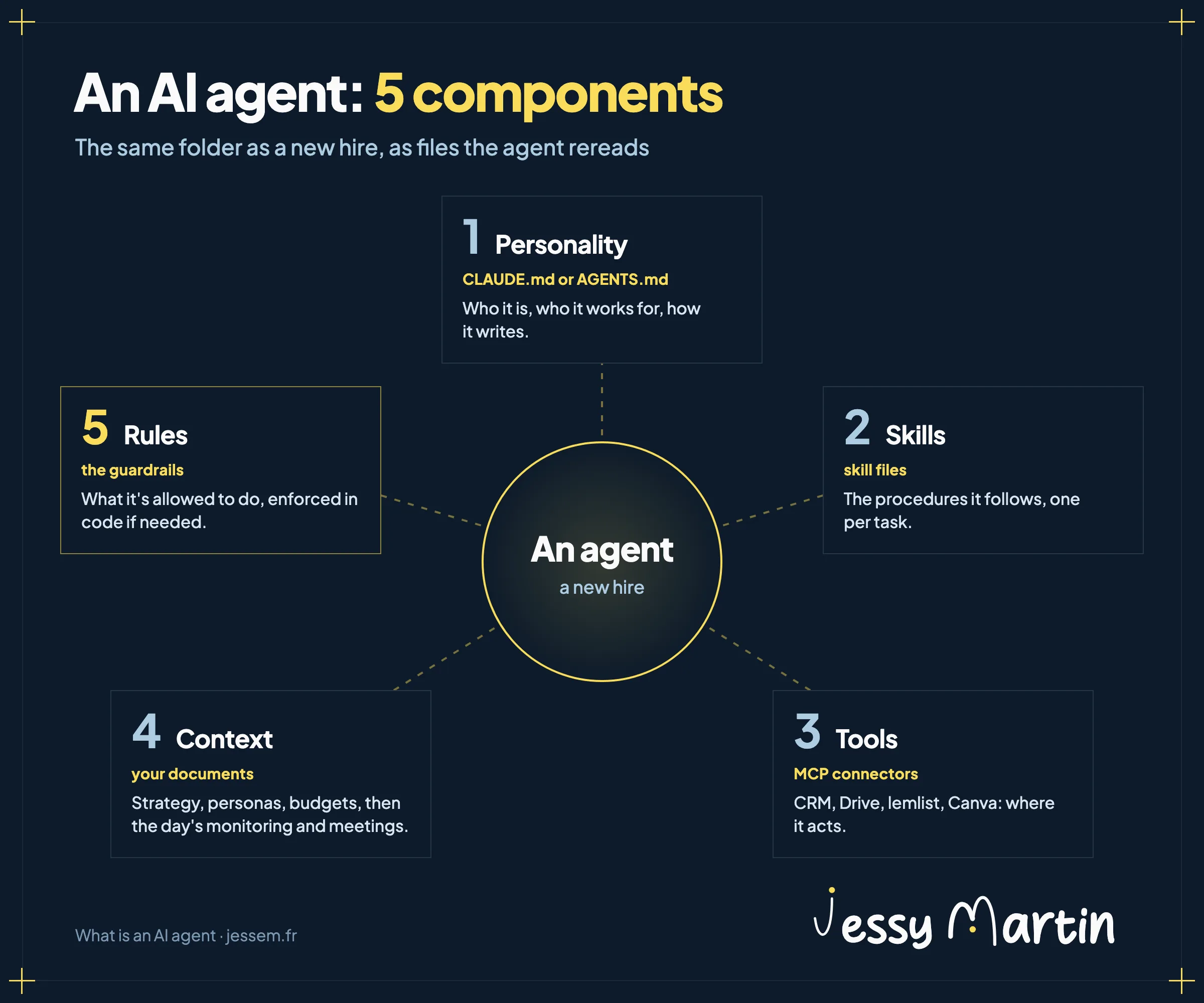
1. Personality: who it is
In Claude, it's a text file named CLAUDE.md, placed at the root of the working folder. Codex, OpenAI's agent, reads its equivalent, AGENTS.md. The agent reads it at the start of every session: who it works for and what it never does. Mine states that I work in French and that my deliverables always address the reader with the formal French “vous.”
2. Skills: what it knows how to do
A skill is a procedure written for a specific task, such as drafting a LinkedIn post or pricing a quote. The agent loads it only when it needs it, so the rest doesn't clutter its memory. I detail the method in Create your first Claude skill.
3. Tools: where it acts
Without tools, an agent can only talk. Connectors built on the MCP standard (Model Context Protocol, the protocol that links an agent to a piece of software) give it access to your CRM, your Drive, your email marketing tool or Canva. Mine is connected to lemlist for prospecting and to Notion. Each connection also opens a door to your customer data: the GDPR precautions are in Connecting AI to your CRM.
4. Context: what it needs to know
Context is what you pass on to a new hire during their first week: the strategy, the target audiences, the budgets, the campaign calendar. Then, as things come up, the news monitoring and the meeting notes. An agent without context produces generic work, however powerful the model. That's the whole subject of AI brand memory.
5. Rules: what it's allowed to do
The last component is the most neglected. A rule written in the CLAUDE.md is still just an instruction: the agent follows it most of the time, and sometimes it forgets. For what must never happen, the rule moves into code. Claude Code calls this a hook: a small script that fires at a precise moment, before each command for example, and can stop it.
I learned this the hard way. On October 12, a command run by Claude overwrote 80 files I hadn't yet saved to my version history. Since then, a hook refuses that type of command in my main folders, and I've stopped counting on the agent's memory for it.
I cover hooks and control loops in detail in Controlling your AI agents with Claude Code hooks.
The missing component in marketing: the brand
Ask a well-equipped agent that knows nothing about your brand for a post. The text comes back clean, and generic. A language model writes the most probable continuation; without precise instructions, the most probable is the average of everything it has read.
Your readers spot the signs in one line: long dashes in every sentence, the “it's not a tool, it's a revolution” turn of phrase, emoji as bullet points, the closing question “what do you think?”
The brand brain fills 2 components at once. Context first: your guidelines, your tone, your real examples and your no-gos, stored in files the agent rereads before every piece it produces. Rules next: a script checks every piece before you do and flags any color outside the palette, any word on your banned list, down to a field left empty in a template. Tone and substance stay with your review. The same guidelines also drive brand videos, as I show in Brand motion design with Claude Code.
The method for encoding your guidelines layer by layer is in AI brand guidelines.
Your agent checks your brand before every piece of content
The brand brain workshop: 5 video modules, including one on AI agents and how to control them with code, and a kit that Claude sets up with you in about 3 hours.
See the workshopWorkshops and the community run in French.
AI agents already at work in marketing
The agents I use every week are nothing spectacular. They take on repetitive tasks that still call for judgment, and they leave the decision to me.
- News monitoring. Before a post, an agent looks for the hot topics in my field and suggests angles. I choose.
- The brand reviewer. Before anything is published, it screens the text against my banned words and my tone rules.
- Email triage. Twice a day, it spots the replies waiting on me and prepares drafts that I review before sending. The full routine is in Claude scheduled tasks sort my inbox twice a day.
- The sales director. After a meeting with a prospect, it reads the transcript, settles the offer with me and prepares the proposal.
The details of my 10 agents, with what each one replaced and its limit, are in 10 AI agents that work on my marketing every week. For LinkedIn, I published my agent as a free template: create a LinkedIn agent with Claude Code.
My clients build their own. At Horizon Humain, the communications officer handed meeting summaries over to Claude.
Claude picks up the transcript, writes the summary in our brand style and sends it to the whole team, without me having to ask.

Where to start
Start with a single agent, on a task you do every week and know how to judge. Write its personality in one page, add one skill, and watch what it produces for a month before you open your tools to it.
On the software side, Claude Code is enough to get started: you use it in the Claude desktop app, in the Code tab, where it reads your files and runs your skills as well as your hooks. It requires a paid plan (Pro, Max, Team or Enterprise).
Training on these agents can be funded: in France, the OPCO [skills operator] or your industry's training fund often covers part of it, as I explain in funding AI training with an OPCO. To see where your teams stand, the AI at Work Barometer gives benchmarks from 219 professionals.
To take stock of your team before you start, the free diagnostic takes a few minutes (the questionnaire is in French). And if you want to learn to build and run these agents across your whole marketing production, that's the program of the next Full stack marketer session, held in French.