
Why an instruction isn't enough
On October 27, I asked Claude for the infographic in the article on the 5 components of an AI agent. My signature always appears there in the same form: a hand-drawn J and M, each with its gold dot. The rule had been written in my working notes since September.
Claude typed “Jessy Martin” in the right font. The result imitated my logo, without the 2 gold dots. I caught it by eye, and within the hour, a hook was checking every infographic.
An instruction in natural language remains a probability. The model often follows it, and all the more so when it's short and close to the task. Over a long session, with dozens of files open, it ends up taking a back seat. The Claude Code documentation sums up what hooks bring.
…deterministic control: certain actions always happen rather than relying on the LLM…
Claude Code, Automate actions with hooks
What a hook is in Claude Code
A hook is a command, usually a small script, that you register in a Claude Code settings file. At each event you choose, Claude Code runs it and passes it a description of the action in progress: the tool being used and the file or command involved.
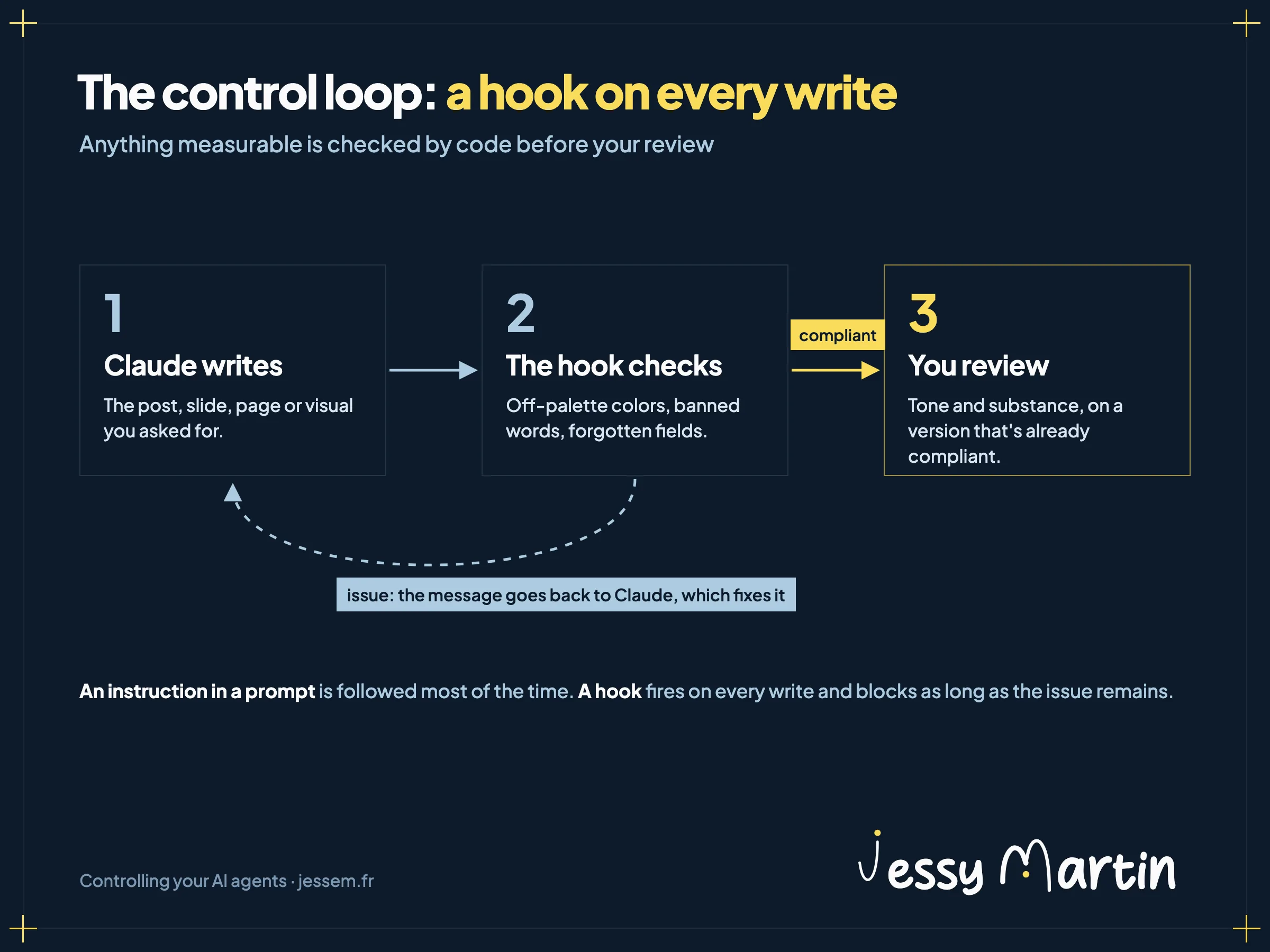
The script decides. If it exits with code 2, the action is blocked and its message goes back to Claude, which takes it into account to make the fix. If it flags nothing, everything carries on as usual.
| Moment | Event | Marketing example |
|---|---|---|
| Before an action | PreToolUse | Refuse a command that erases unsaved work |
| After a file is written | PostToolUse | Check the colors and banned words of a post or a visual |
| At the end of a response | Stop | Check that an article has its illustration and its place in the sitemap |
| When a session starts | SessionStart | Recall the work left unfinished the day before |
| When you send a request | UserPromptSubmit | Add the current campaign to the context |
Here's what registering a hook looks like when it runs a brand check after every file write.
{
  "hooks": {
    "PostToolUse": [
      {
        "matcher": "Write|Edit",
        "hooks": [
          { "type": "command", "command": "python3 tools/brand-check.py" }
        ]
      }
    ]
  }
}
For decisions that call for judgment, Claude Code also offers hooks that hand the check over to a model. I keep those for rare cases: a check written in code gives the same answer on every run.
4 Claude Code hooks that run in my setup
1. The infographic signature
After every write to an infographic, and before every capture as an image, it compares the strokes and spacing of my signature with those in my site's footer. At the slightest gap, Claude receives the finding and the capture is refused. The footer is the reference: if my logo changes, the check follows with no edits needed.
2. The guardrail against destructive commands
On October 12, a command run by Claude overwrote 80 files I hadn't yet saved to my version history. Since then, before every command, a hook refuses the ones that erase work in my main folders. They remain possible in a disposable working copy, after an automatic backup.
3. The blog publishing checklist
At the end of each response, if an article was touched, a hook checks that nothing is missing for its publication: update date, illustration, podcast, card in the blog index, sitemap and home page. If a piece is missing, Claude can't close its response and receives the list of what's left to do.
4. Work left unfinished
At the end of each response, one last hook checks whether work has been waiting for more than 2 hours without being saved, or has never been pushed online. It warns me, and a notification appears on my Mac if I close the session and leave something behind.
The brand check hook
In marketing, the first hook to write checks your brand guidelines. In the kit from the brand brain workshop, a script reruns the check every time a file is written. It spots colors outside your palette and words on your banned list, down to a template field left empty, then sends its findings back to Claude.
brand-check.py post.html
line 3 · color #1E5AA8 outside the palette
line 5 · banned word “revolutionize”
line 6 · empty field {{first_name}}
3 issues. Fix before delivery.
Claude makes the fixes, the script runs again, and the loop continues until there are zero issues. You only ever review compliant versions, and your review can finally focus on tone and substance. How to organize the guidelines themselves is covered in AI brand guidelines.
A brand check on every write
The brand brain workshop: your guidelines stored as files that Claude rereads before every piece it produces, and the hook that checks every piece of content before you do.
See the workshopWorkshops and the community run in French.
Loops that run without you
The brand hook creates a first loop, at the scale of a task: write, check, fix, then start again. A hook at the end of a response can do the same at the scale of a whole response, by asking Claude to keep going as long as a condition isn't met. Claude Code caps this mechanism: after 8 blocks in a row with no new action, it ends the loop.
The second loop plays out over time. A scheduled task relaunches an agent at a set time, without you opening anything. That's how my email triage runs, twice every business day: the routine is detailed in Claude scheduled tasks sort my inbox twice a day.
Writing your first hook
- Choose a rule that can be measured and must never be broken: a color, a banned word, an empty field, a folder to protect.
- Describe it to Claude Code in one sentence. It writes the script and registers it in the settings, at the level of your account or of a single project.
- Test it on files that deliberately break the rule. For the signature, I made 3 copies, 2 of them wrong, before trusting the check.
- Keep what calls for judgment for your own review: the tone and angle of a text.
A badly written hook can also block legitimate work. Testing it on copies that break the rule and copies that follow it shows that it stops the mistake and lets everything else through.