

What a LinkedIn agent in Claude Code does
An AI agent receives a goal and acts in your tools until it gets the result. This one works for your LinkedIn profile, and it covers the whole life of a post: the topic, the text, the visual, the scheduling, then the review.
It fits in a folder. The CLAUDE.md file at its root tells the agent who it serves and what it never does. The voice/ and profile/ folders hold your voice and your audience, with numbers to back them up, and the 7 skills draw on them for everything they produce.
Each Claude Code session begins with a fresh context window.
Claude Code documentation, How Claude remembers your project
Hence these files. The agent rereads them before writing a single line, and they're what keep it writing like you from one week to the next.
| Skill | What it does | When |
|---|---|---|
onboarding | Calibrates the agent on you | Once, then on request |
veille-contenu | Sourced, dated topic ideas | Every week |
my-viral-post | The post in your voice, then its scheduling | Before each post |
image-linkedin | An image with you in the scene | Depending on the post |
carte-linkedin | A card or an infographic | Depending on the post |
carrousel-linkedin | A carousel exported as a PDF | Depending on the post |
bilan-performance | The month's results and 3 decisions | Every month |
Where this template comes from
It comes out of my content studio, the agent that has prepared my posts and their visuals since late June 2026. It has 11 skills today, and as of October 28 its production log holds 448 entries, covering 38 distinct LinkedIn posts.
On June 26, I published a copy on GitHub, emptied of my data, under the MIT license: Littlpinguin/linkedin-agent-template. It differs from my studio on 2 points. My studio also carries Qiplim, the product I'm building, and it adapts my content for TikTok and Instagram. The template stays focused on LinkedIn and on pure personal branding: your face and your voice, with no secondary brand.
Version 2, released on October 19, adds a guided onboarding, weekly monitoring, your photos in the generated images and a recipe for your posts drawn from your own numbers. Version 2.1, out the same day, schedules the posts and reads their results.
The skill that writes the posts, my-viral-post, needed 4 fixes on my side before it was reliable. The template inherits them, starting with the first one: ask for the raw material before writing. I tell that story in Create your first Claude skill.
Thibault Winka, a pharmacist and the CEO of Team Officine, uses it for his own posts. His generated scenes, where he appears with his real face, are among the examples in the repository.
Install it in 4 steps
- The folder: on the repository page, click the green Code button, then Download ZIP. Unzip it into your working folder.
- Opening it: in the Claude app, in the Code tab, open the agent's own folder.
- The start word: type
start. The agent reads itsCLAUDE.mdand launches the onboarding, since it isn't configured yet. - Your answers: one question at a time. If a tool is missing, it offers to install it and waits for your approval.
From a terminal, 3 commands are enough before the same start.
git clone https://github.com/Littlpinguin/linkedin-agent-template.git my-linkedin-agent
cd my-linkedin-agent
claude
On October 26, I had a cohort of my Claude for marketing training install the template during a session. The trap to watch for: opening a subfolder, or importing a single file. The agent needs the whole folder, with its CLAUDE.md at the root.
If you then push your copy to GitHub, keep the repository private: once configured, the agent describes your voice and your monitoring. Your photos are excluded from Git by default.
The 11 steps of the onboarding
Plan on about 30 minutes, in one sitting or several. You can skip every step except step 2, the minimum the agent needs to know who it serves. Progress is recorded in profile/config.md, and the word reprendre (French for resume) picks up at the first empty box.
| Step | What it produces | On top of your Claude plan |
|---|---|---|
| 1. Welcome | A check of your tools, installed with your approval | Free |
| 2. You and your business | Your offer and your tone, read from your website | Free |
| 3. Your past posts | 30 to 100 posts, with their reactions and their format | Apify, or LinkedIn's free export |
| 4. Your voice | Your editorial identity and your recipe | Free |
| 5. Your audience | 5 questions, from their problem to the action you expect | Free |
| 6. Your visual style | Inferred from visuals you like or from your best posts | Free |
| 7. Your 3 photos | 1 from the front and 2 in profile, with your consent | Free |
| 8. Images | A Google key or a connector you already use | Paid per image, or free cards |
| 9. Your monitoring | A first live monitoring run, then a routine | Free |
| 10. Publishing | Zernio connected and your time slots chosen | First 2 accounts free |
| 11. Wrap-up | A summary, then your first post | Free |
For each tool, the agent offers 2 or 3 options, including a free one, and spells out the limits of each. At step 3, I recommend Apify, the only option that brings back the reactions and the format of each post. The free account gives you $5 of credit per month, and the scraping tool costs from $1.50 per 1,000 posts: a history of 100 posts fits easily. The template restricts it to your own profile, in line with LinkedIn's terms.
Keys never go through the conversation. You write them in the .env file, and the agent only checks that the line is filled in, without displaying the value. If you paste one into the chat anyway, it advises you to revoke it and create a new one.
For photos, the image model copies the angle it sees: hence 1 photo from the front and 2 in profile, one from each side. The agent looks at each one and asks for it again if it's blurry or too small. It uses them only with your consent.
Automating your LinkedIn posts with Claude every week
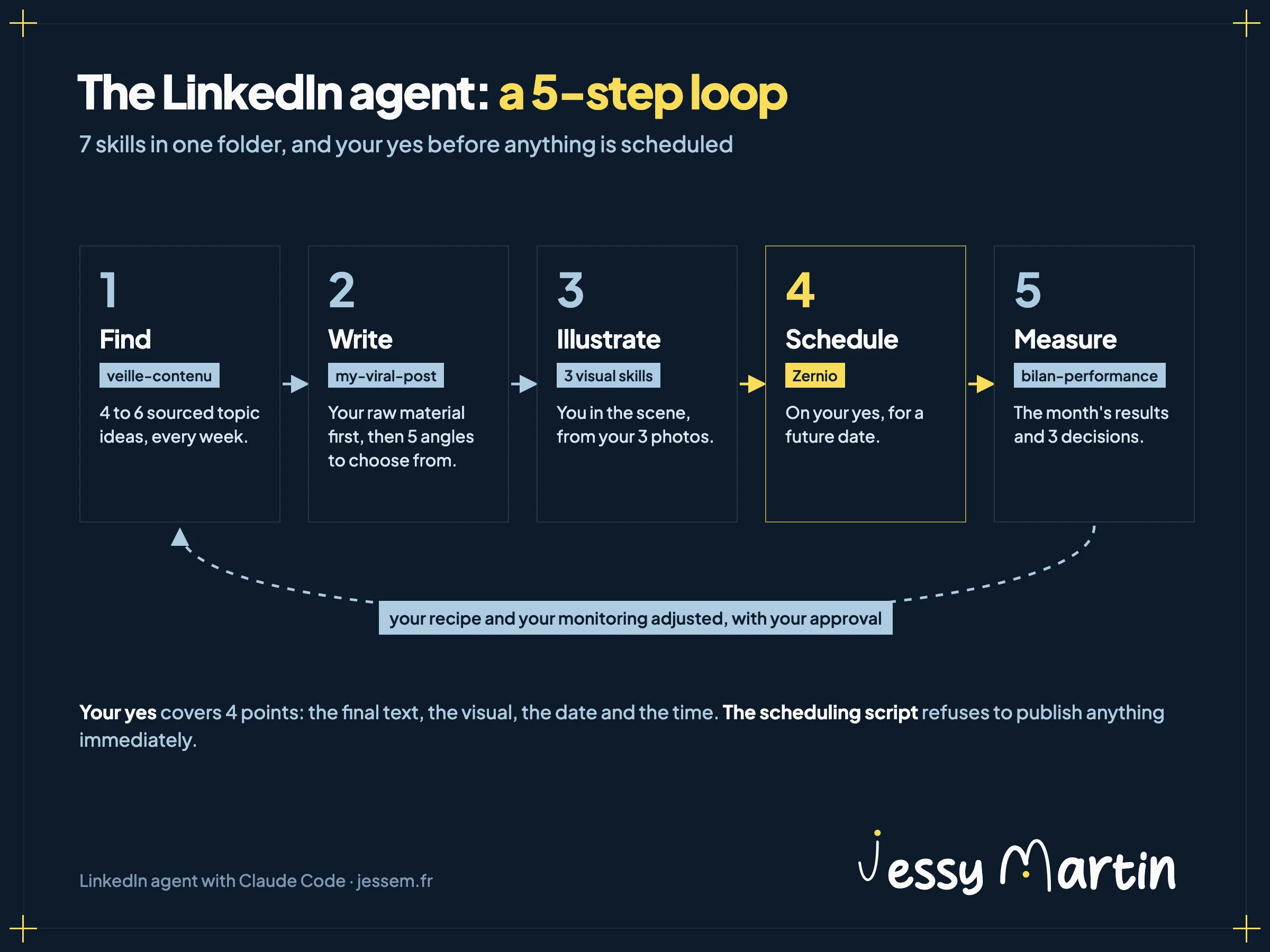
Once the agent is configured, the loop comes down to 5 steps, from monitoring to the monthly review.
Finding the topic
The veille-contenu skill launches up to 6 subagents in parallel, one per category of sources, over the last 14 days. It returns 4 to 6 topic ideas, each with its dated source and a candidate hook. A log keeps track of every angle: a published idea doesn't come back for 8 weeks.
It runs on its own if you schedule it, on Mondays at 8 a.m. by default. According to the Claude Code documentation, a scheduled task in the app reads the files on your computer, as long as the app is open and the computer is awake. A missed run is caught up once when the computer wakes. A task scheduled in the cloud runs with your computer off, on a copy of your private GitHub repository.
The details of a routine like this one are in Claude scheduled tasks sort my inbox twice a day, and the monitoring method is in Automate market monitoring with Claude.
Writing from your raw material
The my-viral-post skill starts with questions: the topic, then the lived experience or the real number that only you can bring. It then suggests 5 angles, each tied to a register that works for you, and assembles the one you pick.
Before writing, it rereads your last 5 approved posts. If they diverge from the onboarding recipe, they win, because they carry your most recent edits. It also flags a draft that reuses the hook of one of your last 2 posts.
Each approved version goes into the outputs/registry.csv log, with one of its 5 statuses, from raw to published. On July 31, my studio suggested a post I'd already published: its entry had stayed at the approved status. Since then, every change of status gets logged.
The visual that goes with it
The format follows the post's register. An opinion or a contrarian take calls for an image with you in the scene, and educational content for a carousel or an infographic.
For a scene, image-linkedin picks the photo whose angle matches the framing, then goes through Nano Banana 2.1, Google's image model, or through your connector. Carousels come out as a PDF made of images, sharp in every viewer. The logic of these visual skills is described in LinkedIn carousels with Claude Code.
Scheduling
Once the text and the visual are approved, the agent suggests the next free slot and recaps, in one go, the 4 points it needs your yes on: the final text, the visual, the date and the time. It then schedules the post on Zernio, a scheduling service whose first 2 connected accounts are free.
The scheduling script refuses to publish right away, and to schedule less than 10 minutes ahead: it schedules for a future date, or saves a draft.
The monthly review
Every month, bilan-performance collects the impressions, reach, reactions, comments, reposts and saves of your posts. It compares them with your recipe and ranks what worked by register, format, hook and time slot. Then it suggests 3 decisions for the following month. Your recipe and your monitoring only change with your approval.
It also knows when to hold back: as long as fewer than 4 posts are more than 7 days old, it shows the raw numbers and calls the review premature.
Build your LinkedIn agent and the ones after it
The next Full stack marketer session: 21 hours to build and run your agents on your own marketing production, with Claude Code.
See the sessionThe sessions are held in French.
The guardrails written into the template
The rules that protect your account are written in the template's CLAUDE.md, which the agent rereads at every session.
- Your yes before anything goes out, and never an immediate post.
- No spending without approval: for Apify as for a generated image, the agent announces the likely cost and waits.
- Your face only, with your consent. No other real person without their agreement.
- No fake documents: a visual made to pass for a real screenshot or a real chart is never published as authentic.
Your posts and your photos are personal data. The folder stays on your computer. Its content goes through Claude at every session, and your photos through the image service you chose. The .gitignore file keeps your photos and your keys away from GitHub. The rules to know before you hand data to an AI are in AI on your customer data.
Some of these rules are already in the code, such as the refusal to publish right away. The others remain instructions, which the agent follows most of the time. For the ones that must never give way, a hook checks them at every action: the method is in Controlling your AI agents with Claude Code hooks.
The limits
Statistics. On a personal profile, LinkedIn only provides a post's numbers if it was published through Zernio, or imported afterward with its URL. A company page is fully covered. For posts you published by hand, the review imports them one by one with their link, or asks you to paste your numbers.
Raw material. The agent writes from what you bring it, a client project or a real number. Without it, it stops and asks you for it. That's by design, and it's the fix that made my own skill reliable.
The environment. In Cowork or a sandbox without network access, fetching posts and generating images can fail. The onboarding detects it and switches to LinkedIn's official export and to HTML cards you open in your browser.
Language. The template's instructions are written in French. The agent still learns its voice from your posts, and it writes in the language you publish in.
Where to start
Do the onboarding in one go if you can, with your 3 photos and your Apify token at hand. Then review your first 3 posts closely: your edits become the approved posts the agent rereads before each new text, and that's where its voice gets closer to yours.
Which post have you been putting off for weeks?