
You have brand guidelines in a PDF, an editorial guide somewhere on a shared drive and a photo library sorted by year. A designer reads them and understands. An AI agent reads them and guesses.
As long as you were producing content yourself in a chat window, you fixed that vagueness by hand, message after message. The day you hand production to an agent that chains tasks on its own, you pay for it in hours of review.
You can encode your brand elements (guidelines, tone, photos, logos, past work) so that an agent reads them, uses them and gets checked against them. That's the prerequisite for delegating day-to-day production to it without losing your identity. It's also what lets you switch AI providers the day you decide to.
Why AI brand content ends up looking the same
A language model writes the most probable continuation. Without precise instructions, the most probable is the average of everything it has read: the one-size-fits-all LinkedIn tone, corporate blue, the handshake photo.
Classic brand guidelines don't help much. They're written for a human who interprets: “a warm but expert tone”, “bright visuals”.
Your designer knows what that means at your company because they've seen your last 3 campaigns. The agent only has the sentence.
On top of that come 3 flaws I often find in the brand files I audit:
- the same rule written in 2 places, in 2 versions that have drifted apart: the agent applies whichever one it reads first;
- references to documents that no longer exist: faced with a missing file, the agent improvises without telling you;
- no record of what was rejected and why: the agent repeats the mistakes you've already corrected.
The model follows what you give it to read. So the job is to give it a brand it can read.
The 4 layers of AI-readable brand guidelines
A brand mixes rules of very different kinds: a color is measured, a tone is judged, image rights are checked in a contract.
Filed together in a PDF, they all become equally vague.
The split that holds up best today divides the brand into 4 layers, each with its own format and its own way of being checked.
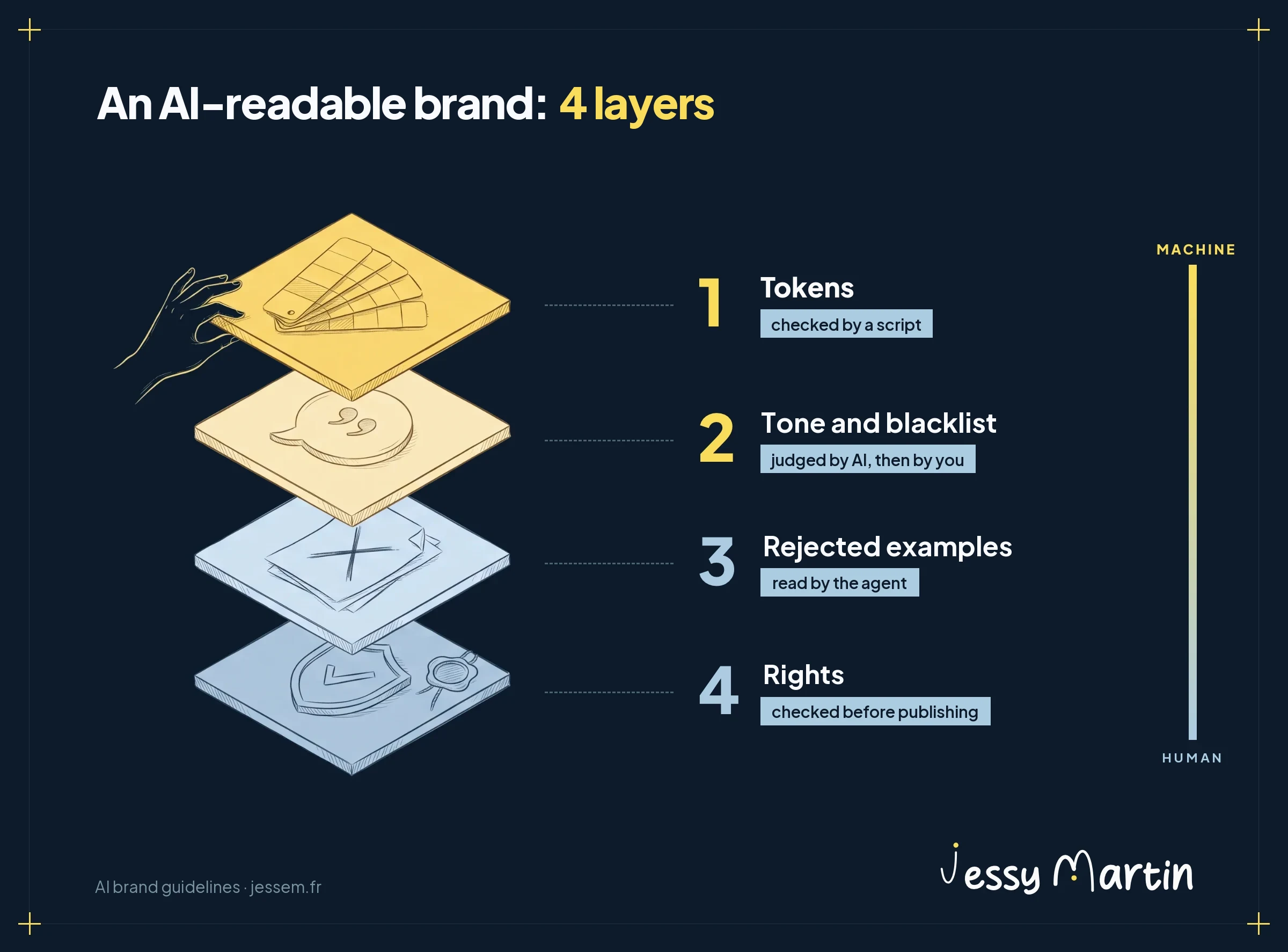
What can be measured moves out of the guidelines and into a file
Your brand blue probably has 3 values: a Pantone for the printer, a CMYK value in the PDF, a hex code in the website CSS. An agent composing a visual takes the first one it finds.
The answer is called a design token: a named value, stored in a file that tools can read.
The reference format comes from the W3C Design Tokens Community Group, and its first stable version dates from October 28, 2025. Each token has a name, a type and a value. It also accepts extra information: usage, the media where the color is allowed, the tolerated deviation.
That deviation is measured in ΔE, the color difference perceived by the eye. Around 1, it's barely visible. A threshold of 2 per color lets small export variations through and stops the “almost the same” blue.
Without a developer, a table is enough to start: name, screen value, print value, usage, media where the color is banned. If your brand lives in Figma, its variables export to the DTCG format. If it lives in a Canva or Frontify brand kit, use that as a source and keep your own open-format file as the reference: you'll be able to change tools without rewriting the brand.
Tone and blacklist: one text per topic
Tone is judged, so it stays in prose. And prose has a flaw: it gets copied. The instruction is pasted into the prompt for posts, then into the one for the newsletter, then corrected in only one of the two.
Write one file per topic (identity and positioning, tone, blacklist, key messages and proof points) and point to it everywhere else. Before adding a rule, check whether it already exists. And check that every document cited in your instructions really exists: it's the most cost-effective check in a brand audit for agents.
The blacklist lists the words and phrasings your brand rejects, including the tics that give away generated text. Write it with real cases and a rewrite for each one. An agent learns better from a correction than from an abstract ban.
| Rejected wording | Reason | Rewrite |
|---|---|---|
| “Revolutionize your communication” | hype vocabulary, no proof | say what changes, with a number to back it up |
| “A simple, fast and effective solution” | 3 empty adjectives, no verifiable fact | name the result: “set up in 2 days” |
| “A perfectly consistent brand” | a promise impossible to keep | “color and font deviations are caught before review” |
Rejected examples are the most neglected layer
Every team keeps its published content. Few keep their rejections.
Yet a rejected piece of content, along with the reason it was rejected, is the most instructive example you can give an agent.
“Logo placed on a background that's too light.” “Number attributed to a study that doesn't contain it.” “Recognizable stock photo.” Without a reason, a rejection is a silent signal.
Keep a rejections file: the excerpt or image, the reason, the rule broken. Add to it with every correction. The agent rereads it before producing anything.
2 precautions. Anonymize the examples: a client's first name slipped into an internal document can resurface in published content. And never designate an existing piece of content as the model to imitate, or every output will end up looking like it.
Rights are part of the brand
It's the layer almost nobody encodes, and the only one that exposes you legally.
Fonts first. Commercial foundry licenses often forbid embedding the font in an application, or letting users apply it to their own text.
Fonts published under the SIL Open Font License, like most Google Fonts, are free to use, including in the documents you produce. Note for each font what its license allows.
Photos next: who took the image, who appears in it, on which channels and until when you can use it. The IPTC Photo Metadata standard stores this information in the file itself, and its 2025.1 version adds fields dedicated to AI-generated images: the system used, the prompt and its author.
Finally, the provenance of generated images. The C2PA standard signs a file's origin, but many platforms strip that metadata on upload, as the LinkedIn case documented by Fortune shows. So keep a provenance record next to each generated image: model, prompt, reference images, date.
On the legal side, Article 50 of the EU AI Act has applied since August 2, 2026.
According to the European Commission's FAQ, the labeling of generated text covers text published to inform the public on matters of public interest, and the obligation falls away when a human reviews it under their editorial responsibility. Deepfakes, on the other hand, must be disclosed. The details are in what the GDPR and the AI Act require.
Photos and logos: what text can't convey
The grain of a photo, the direction of the light, the way a face is framed: no description reproduces them faithfully. “Warm natural light, tight framing” gives you 10 different images in 10 generations.
For these attributes, show examples. Pick 5 to 10 anchor images that sum up your art direction, and give them to the image model as references at every generation. Nano Banana Pro or Seedream accept several reference images in a single request.
On a long chain (generation, retouching, upscaling), re-anchor at every step: the style drifts a little more with each pass.
For the photo library, the agent needs a catalog before it needs the files. One record per image or series: what it shows, what it's for, with what rights, and its status (current, outdated, withdrawn).
The agent reads the catalog, chooses, then hands the file to the tool by its path. The images themselves stay out of its working memory, which they would saturate.
The logo, headlines and numbers come after generation. Image models distort letters, approximate logos and invent numbers.
The reliable method: AI generates the scene, then the real logo, text and numbers are composed on top (in HTML, Figma or Canva) with your fonts. I apply the same rule to videos, as in these 20 loops generated in Magnific.
How Claude or Codex use your encoded brand
An AI agent is a model that acts: it reads files, calls tools and chains steps until the deliverable is done. Claude, in Claude Code or Cowork, and OpenAI's Codex work this way. Your brand reaches them through 3 channels.
| Channel | What it carries | Example |
|---|---|---|
| Instructions file (CLAUDE.md, AGENTS.md) | what the agent needs to know for every task: where the doctrine lives, the non-negotiable rules | “before any visual, read the tokens and the asset catalog” |
| Skills (SKILL.md) | one method per type of deliverable, loaded only when the task calls for it | the “LinkedIn carousel” skill reads the tokens, the rejections and the last 3 carousels |
| MCP servers | access to your production tools | generate an image in Magnific or through the Nano Banana API, open a Canva design, read a Frontify brand kit |
Anthropic listed following brand guidelines among the uses of skills as early as its announcement on October 16, 2025. And the format is shared: Codex reads the same SKILL.md files, loaded the same way, on demand.
Well-encoded brand doctrine moves from one agent to another without being rewritten.
The MCP protocol connects the agent to your tools. Magnific, which brings together the main image and video models (Nano Banana, Seedream, Imagen, Veo), offers an official MCP server: Claude can generate an image, a video or a sound there without leaving the conversation. Canva, Figma and Frontify have their own as well.
And nothing locks you into a platform. An agent can call any image generation API directly: Nano Banana from Google, GPT Image from OpenAI, or whatever model comes out next month. Give it the API key and the documentation, and it writes the small script that makes the call on its own. Magnific still has the advantage of bringing the models together under a single subscription; the direct API gives you control over every setting and is billed per image.
Put end to end, a campaign visual follows this path.
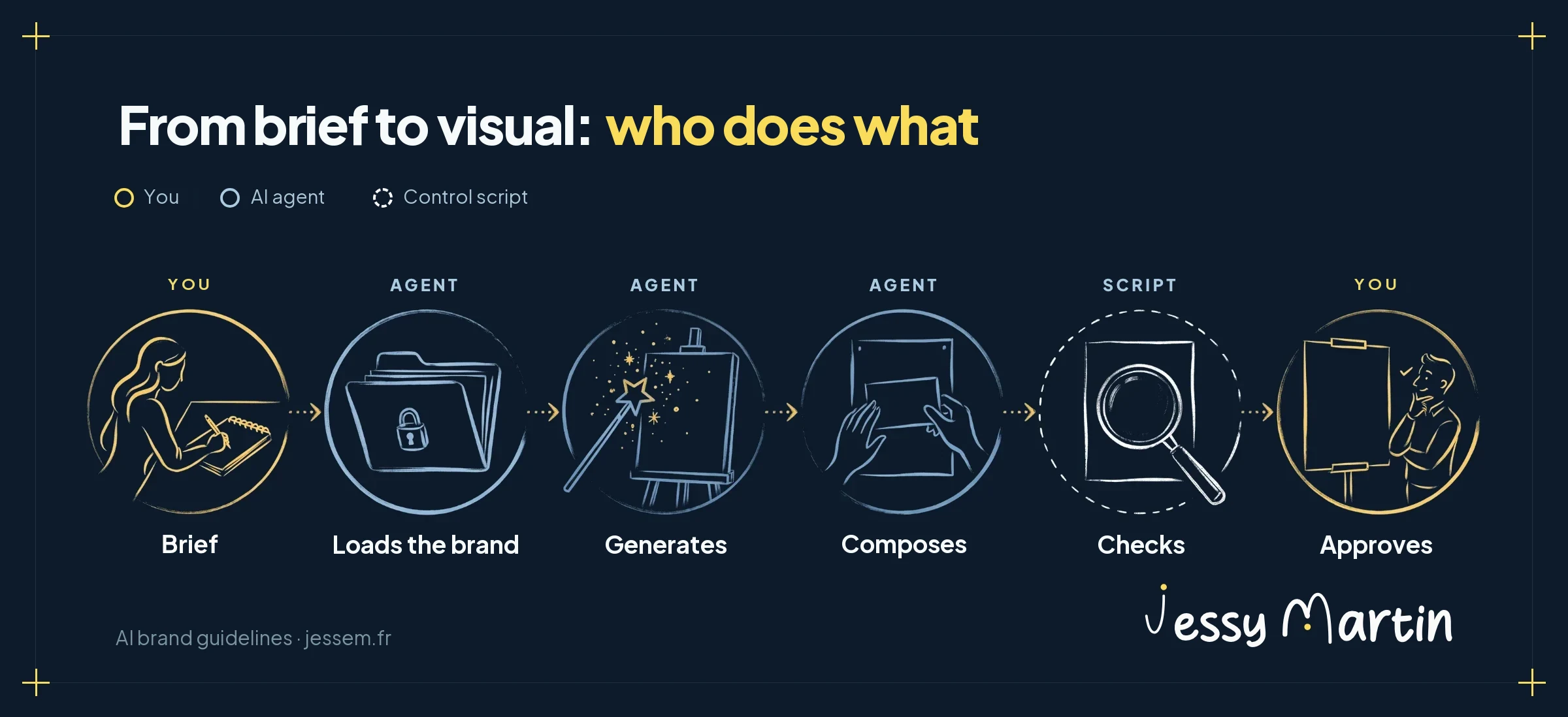
Your review then focuses on what needs your judgment. The mechanical defects were caught earlier. For a complete example of image and video production, see the AI video made with Magnific and Dreamina.
Your files belong to you: switch AI whenever you decide
This method has an effect marketing teams rarely see coming: it makes you independent of AI vendors.
Your encoded brand fits in text files, markdown, JSON and a few scripts. They live wherever you choose: on your computer, in a private GitHub repository, on a server rented from your hosting provider, in your cloud.
Anthropic or OpenAI read them for the duration of a task. The reference version stays with you.
Compare that with a brand stored in a platform's projects or in a proprietary brand kit. The day prices go up or terms change, everything has to be rebuilt somewhere else.
With files, switching agents means pointing another tool at the same folder. Your skills work in Claude Code just as they do in Codex. Your instructions fit in a CLAUDE.md or an AGENTS.md, the file read by Codex and many other agents: 2 files of the same kind, which you can copy from one to the other.
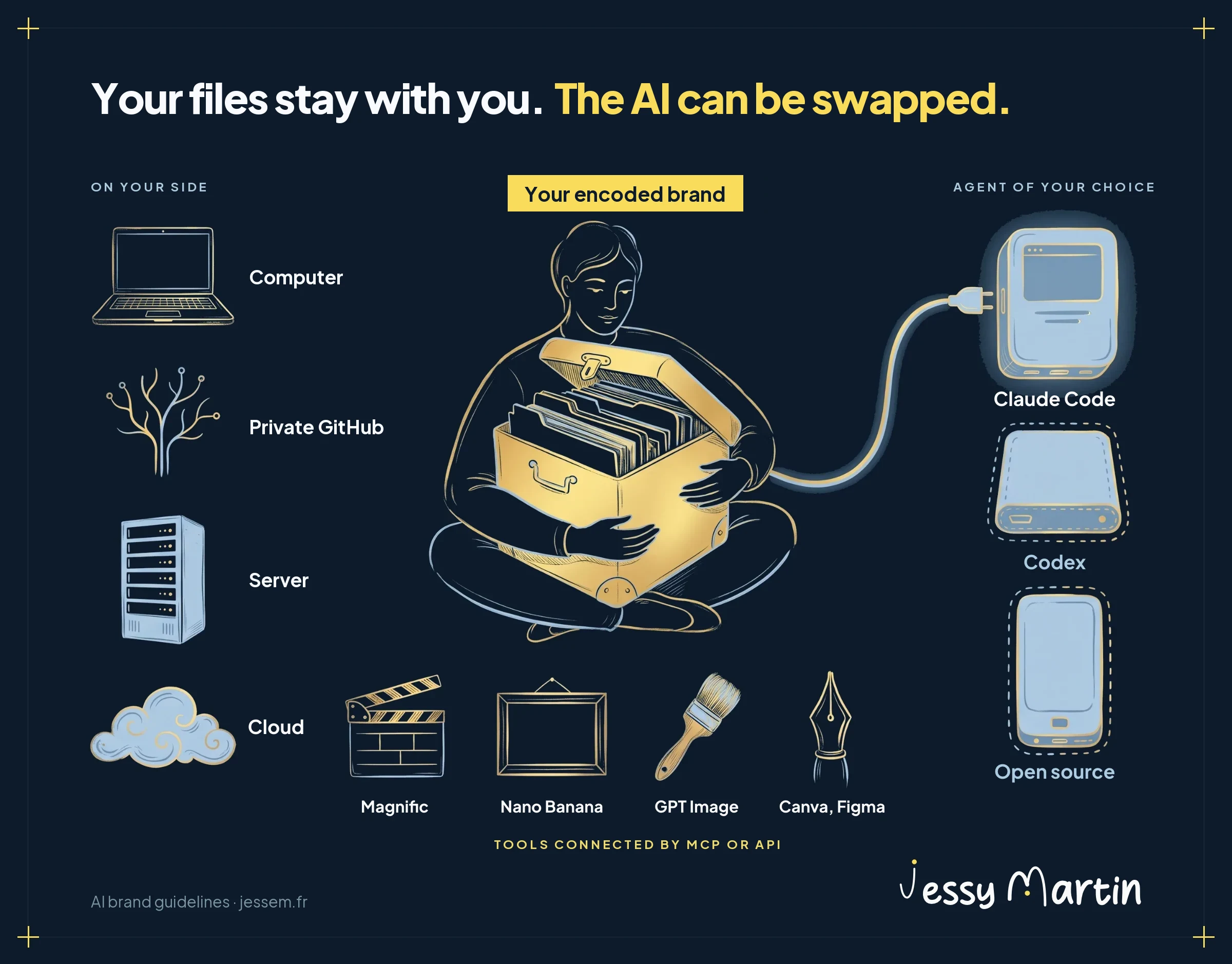
The model itself becomes replaceable. OpenRouter gives access to hundreds of models behind a single API key, including Chinese open-source models, at prices far below those of closed models. Claude Code can even be connected to it by changing 3 environment variables.
| Model | Developer | Price per million tokens, input / output | Stated performance |
|---|---|---|---|
| DeepSeek V4 Flash | DeepSeek, China | $0.054 / $0.242 | 79% on SWE-bench Verified |
| MiniMax M3 | MiniMax, China | $0.098 / $1.21 | close to Claude Sonnet 4.6 on an agentic benchmark |
| GLM 5.2 | Z.ai, China | $0.447 / $3.31 | about 5 points below Claude Fable 5 on the Artificial Analysis index |
Source: the overview of open-weight models published by OpenRouter on June 27, 2026, average prices in dollars. Prices change often.
The pattern taking shape: a top-tier model to build and evolve the system, and a much cheaper model for routine production, since the encoded brand does a large part of the work.
3 caveats before you switch.
Agents are tuned for their in-house models: OpenRouter itself warns that Claude Code may not work well with other providers, and some models handle tool calling better than others.
Writing quality in your language has to be tested on your own deliverables, with your brand linter as the first judge. And a low price tells you nothing about where your data goes: check who hosts the model before sending it any client information, as I explain for connecting an AI to your CRM.
That's what I call taking back control of your tools. The doctrine belongs to you, and the model becomes a supplier you choose task by task.
How to check brand consistency automatically
A written rule is only a reminder. It becomes reliable the day a script checks it.
A brand linter is a small program that rereads every piece of content produced and flags measurable deviations. Claude Code or Codex can write it for you from your tokens file and your blacklist, then run it on every deliverable.
| Check | What it catches | Who decides |
|---|---|---|
| Banned words and phrasings | hype vocabulary, AI writing tics | script |
| Colors | a shade more than ΔE 2 away from the palette | script |
| Fonts | an off-brand typeface, a fallback font showing up at render | script |
| Contrast | text below the WCAG 2.2 ratio (4.5 to 1 for body text) | script |
| Placeholder fields | a forgotten “[CLIENT NAME]” | script |
| Tone, proof, relevance | text that's clean in form and wrong in substance | judge model, then you |
| Framing, video pacing, unclear rights | what no script can judge | you |
Start with the corrections you make most often. They form the list of rules to automate, written by actual use.
A trap to watch for: a check that's impossible to pass soon gets ignored. If your official template fails the rule it enforces, the agent learns that the alert doesn't count. Run the check on every template before you distribute it.
Where to start with your marketing team
3 levels, and each one is useful on its own.
| Level | Tools | What you set up |
|---|---|---|
| 1. No code | a Claude project or Cowork, shared files | one file per brand topic, a file of rejections with their reasons, the colors and typefaces table, a minimal rights register, a 10-point review checklist |
| 2. With an agent | Claude Code or Codex | one skill per type of deliverable, an asset catalog, an inventory of published content, a linter on your 5 most frequent corrections |
| 3. Verifiable system | DTCG tokens, MCP servers | styles generated from the tokens, a measured check on rendered visuals, a provenance record for each generated image |
Level 1 brings the most visible gain: you stop pasting your brand context back into every conversation. I covered this in why your AI prompts forget everything.
And 3 projects can wait.
Training a model on your style: reference images are enough in most cases. Inventing your own guidelines format: the DTCG format covers the need. Connecting an asset manager through MCP: if your photo library fits in a well-kept catalog, the catalog does the job.
Encode your brand in a workshop?
“The brand brain” is coming to the Cockpit workshops: you leave with your brand doctrine encoded, readable by Claude and reusable in every other workshop.
See the workshops