

https://github.com/rtk-ai/rtk with the instruction “install RTK at the root of Claude for all my projects”. Claude runs the commands, you approve them, then you restart the app. From then on, RTK sorts what the terminal returns before Claude reads it. On my computer, across 5,171 commands, it removed a third of the tokens read.Claude Code works by running commands in the terminal: listing a folder, reading a file, searching your documents for a word, checking a project's history. Each command returns a report, and Claude reads all of it. Those reads count against your usage limits, and against the bill when your company pays per use.
RTK (short for Rust Token Killer) sits between the two and filters. I have participants install it in every one of my Claude Code training courses, and it's always the moment when people who have never opened a terminal get lost. So I wrote down the whole path: why RTK matters for a marketing team, the quick install through Claude Code, then the manual install, screenshot by screenshot.
I use and teach Claude Code in the Claude desktop app, in its Code tab, and this tutorial follows that version. All you need is a paid Claude plan: Claude Code is included.
What RTK changes in plain terms
A token is the unit Claude uses to count what it reads and writes, roughly a piece of a word. Every Claude plan gives you an allowance of tokens that refills over a rolling 5-hour window, with a weekly cap on top, according to Anthropic's pricing page. Chat, the app and Claude Code all draw from the same allowance.
The terminal drains that allowance without you seeing it. Asking Claude to check the state of a project is a bit like asking a colleague whether the printer works and getting the 40-page manual as an answer. The useful information fits on one line, yet Claude reads all 40 pages, every time.
There's a second, lesser-known effect. Everything Claude reads piles up in the session's working memory. When that memory fills up, Claude summarizes the conversation to make room, and details of your instructions get lost along the way.
RTK intercepts each command, runs it normally, then passes only the essentials to Claude, usually the lines that changed and the errors. You keep talking to Claude the same way as before. The tool is free and open source (Apache 2.0 license), and its GitHub repository had more than 80,000 stars as of September 25, 2026. The version used in this article is 0.50.0, released on September 24.
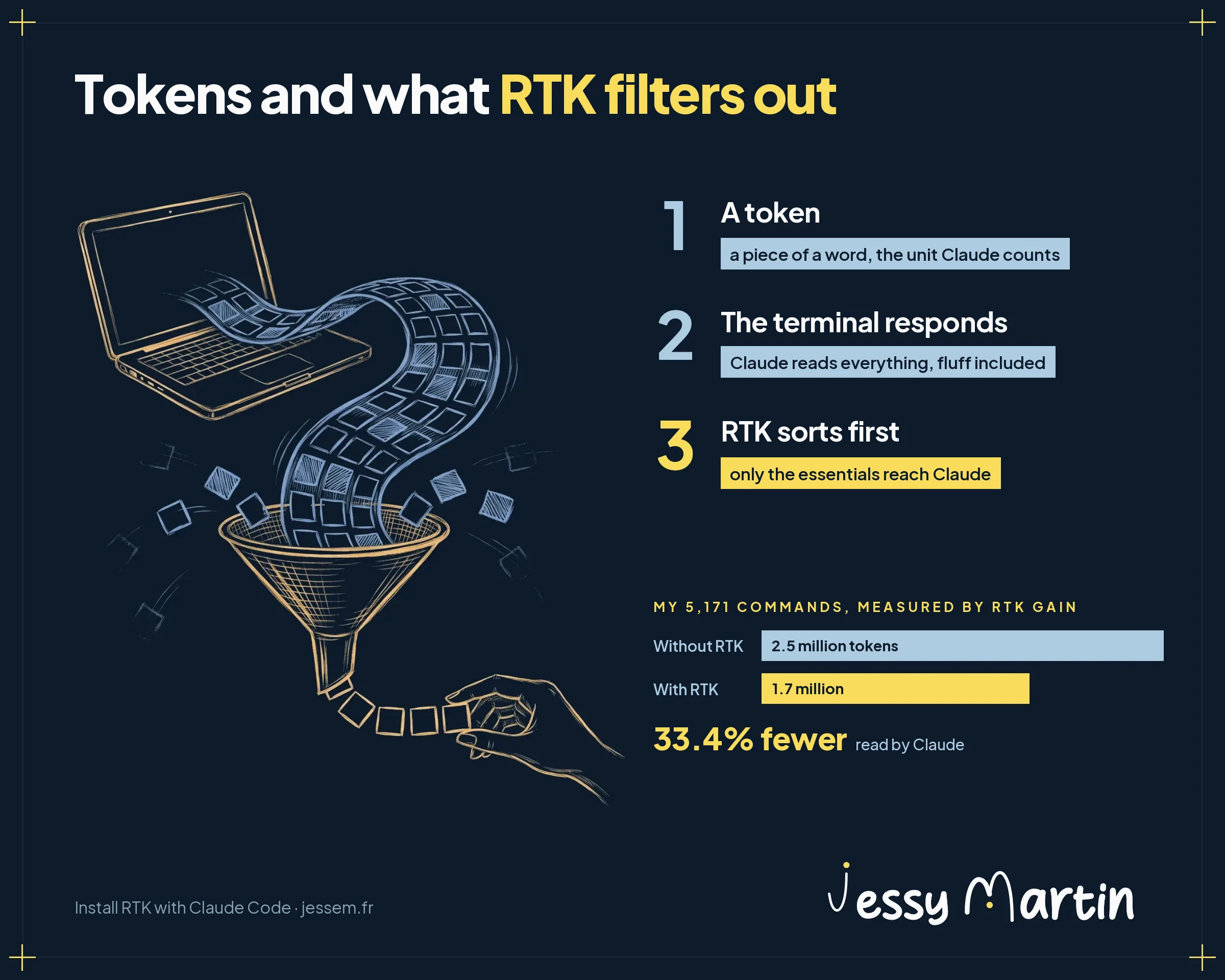
In plain terms: with RTK, Claude reads less noise. Your sessions last longer before you hit the limit and, if your company pays per use, the bill goes down.
Why Claude Code makes sense for a marketing team
I recommend Claude Code to marketing and communications teams that produce a lot, even though the word code in its name scares many people off. RTK adds one more argument.
It's already in your plan. Claude Code is included in every paid plan, from Pro to Team seats, and draws from the same allowance as your conversations. Trying it costs nothing extra.
Your brand lives in files. Brand guidelines, tone, approved and rejected examples are stored in files that Claude rereads in every session and that the whole team shares. Skills, those bits of know-how stored in folders, load only when Claude needs them, which conserves the allowance. I described this setup in my article on brand guidelines an AI can read.
You see what uses up tokens. In Claude Code, the /context command shows what fills the session's working memory, and rtk gain puts a number on what RTK removed. In a regular chat, you have neither.
You cut consumption once and for all. RTK is installed once per computer, in a few minutes, then works in every session without anyone changing how they work.
What RTK changes depending on your Claude plan
The prices below are the ones shown on Claude's pricing page on September 25, 2026, in US dollars, excluding tax.
| Plan | Listed price | How usage is counted | What RTK gives you |
|---|---|---|---|
| Pro (individual) | $17 per month billed annually, $20 billed monthly | Allowance per 5-hour window, weekly cap | More work before you hit the limit |
| Team, Standard seat (2 to 150 people) | $20 per seat per month billed annually, $25 billed monthly | More usage than Pro, same allowance principle | Fewer cutoffs in the middle of production |
| Team, Premium seat | $100 per seat per month billed annually, $125 billed monthly | 5 times the usage of a Standard seat | The day someone needs a Premium seat comes later |
| Team, extra usage | At API rates | Billed per token once the allowance runs out | Every filtered token comes off the bill |
| Enterprise | $20 per seat per month billed annually, plus usage at API rates | Billed per token, spending caps set by the admin | A direct cut in the usage line, and caps reached more slowly |
Applied to my own numbers: at API rates, the 831,800 tokens RTK saved me are worth about $3.33, based on $4 per million tokens read by Opus 5.5. That's modest, and it's a floor. RTK counts only the first read, while every output Claude reads stays in the conversation and goes through again, at the discounted cache rate, at every later step of the session.
For a team lead, the value comes down to 2 points. Consumption becomes measurable computer by computer, with rtk gain. And a spending line goes down once and for all, without asking anyone to change their habits.
The quick method: let Claude Code install it
This is the method I recommend in my training courses. Open the Claude app, switch to the Code tab, choose any working folder, then paste this instruction:
https://github.com/rtk-ai/rtk
Install RTK at the root of Claude so I can use it in all my projects. Hook it up with rtk init -g --auto-patch, then check with rtk init --show.
“At the root of Claude” means the .claude folder in your home folder, the one that holds the settings for all your projects. Claude Code reads it no matter which folder is open. Installed in a single project, RTK would only work in that folder.
Claude reads the GitHub page, installs RTK (with Homebrew on Mac, winget on Windows), then hooks it up. Before each command, the app shows a permission request: read the proposed line, then approve it. If a step needs your computer password, such as installing Homebrew, Claude gives you the line to paste into the Terminal on your Mac (or on Windows) and waits until you've run it.
Keep the --auto-patch option in the instruction. When Claude runs it, the rtk init -g command can't ask you its confirmation question: it answers no on its own, and RTK stays unhooked. I checked this while preparing this article.
When Claude is done, quit the Claude app completely, then reopen it: the hook is only read at startup. On Mac, press Cmd + Q; on Windows, make sure the app isn't still running in the background. Then check that everything works using the Check your savings section.
The manual method step by step
Would you rather stay in control, or is Claude stuck on a step? Here is each step, with what you'll see on screen. You type these commands in your computer's Terminal, outside the Claude app. If you use Claude Code from the command line instead, everything applies the same way; my guide to setting up your work environment with Claude Code explains that installation.
Step 1: open the terminal without stress
The terminal is a window where you control your computer by typing instructions. On Mac, press Cmd + Space, type Terminal, then press Enter. On Windows, right-click the Start button and choose Terminal (or Windows PowerShell on older versions).
4 habits to keep in mind:
- every command block in this article has a Copy button: use it to avoid retyping;
- paste with Cmd + V on Mac or Ctrl + V on Windows, then press Enter;
- a command is finished when the input line reappears, the one ending in
%,$or>; - when your Mac asks for your password, nothing shows while you type. That's normal: type it blind and press Enter.
That last point is the snag I see most often in training sessions: people think the keyboard has stopped responding.
Step 2: install RTK on Mac
On Mac, RTK installs with Homebrew, the terminal's app manager: a kind of App Store for the command line. To find out whether it's already there, type brew --version. If a version number appears, move on. If the terminal replies command not found: brew, install Homebrew with the official command published on brew.sh:
/bin/bash -c "$(curl -fsSL https://raw.githubusercontent.com/Homebrew/install/HEAD/install.sh)"The install asks for your Mac account password and takes a few minutes. At the end, the terminal shows a paragraph titled Next steps, with 2 or 3 command lines. Copy them and run them one at a time: without them, the brew command can't be found. It's the easiest step to skip.
Once Homebrew is in place, install RTK, then check its version:
brew install rtk
rtk --version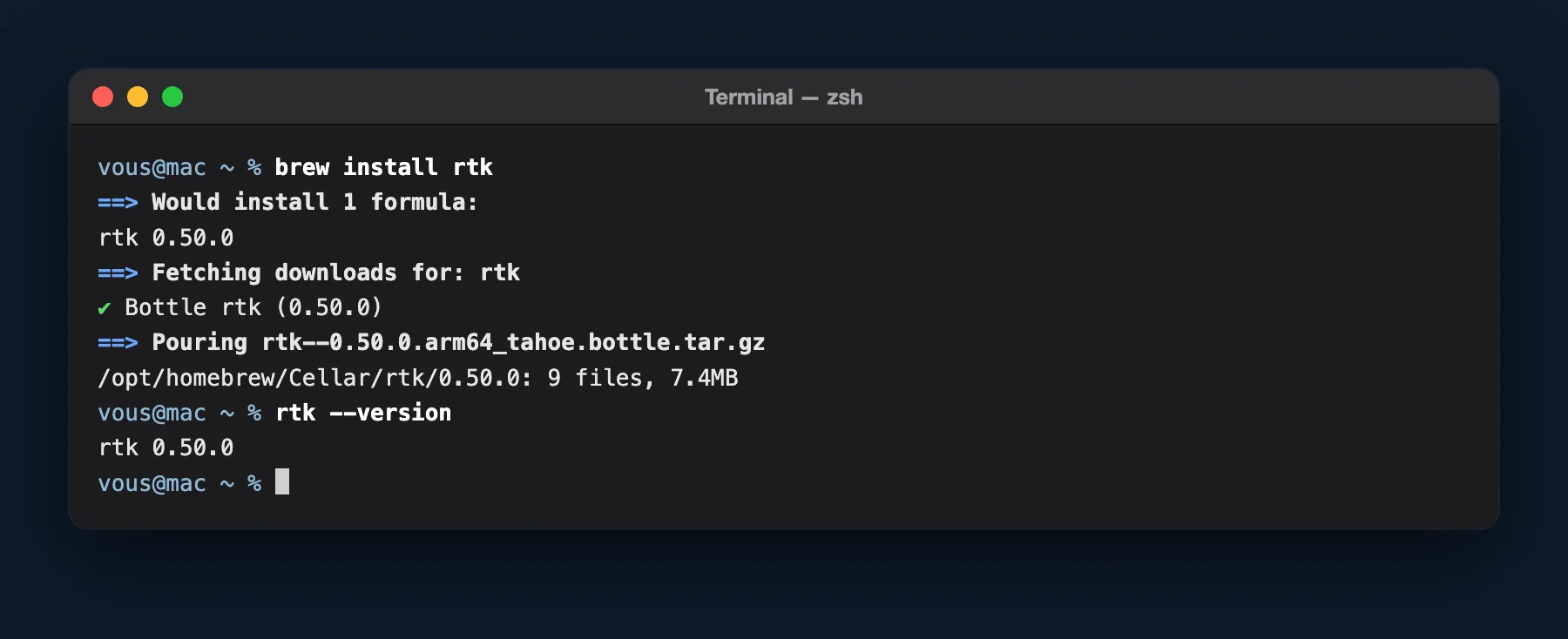
rtk --version replies with the version number.Step 2b: install RTK on Windows
Windows 11 and recent versions of Windows 10 ship with winget, Microsoft's app manager. Install RTK, then ripgrep, a search tool that some RTK filters rely on (without it, RTK works but shows warnings that worry people for nothing):
winget install rtk-ai.rtk
winget install BurntSushi.ripgrep.MSVC
Then close the terminal and open a new one: Windows only picks up new commands when a window opens. Check with rtk --version. And don't open the rtk.exe file with a double-click: the window closes immediately, which makes it look like the install failed.
Step 3: hook RTK up to Claude Code
RTK is on your computer, but Claude Code doesn't know it exists yet. One command, the same on Mac and Windows, makes the connection for all your projects at once (the -g stands for global):
rtk init -gRTK asks you 2 questions, which you can spot by the [y/N] at the end:
- Patch existing settings.json? Type
ythen press Enter. This yes is what hooks RTK up to Claude Code. Answering N, or pressing Enter without typing anything, leaves RTK installed but unhooked. - Enable anonymous telemetry? Type
nthen press Enter, unless you want to send usage statistics to the publisher (details in the Security and data section).
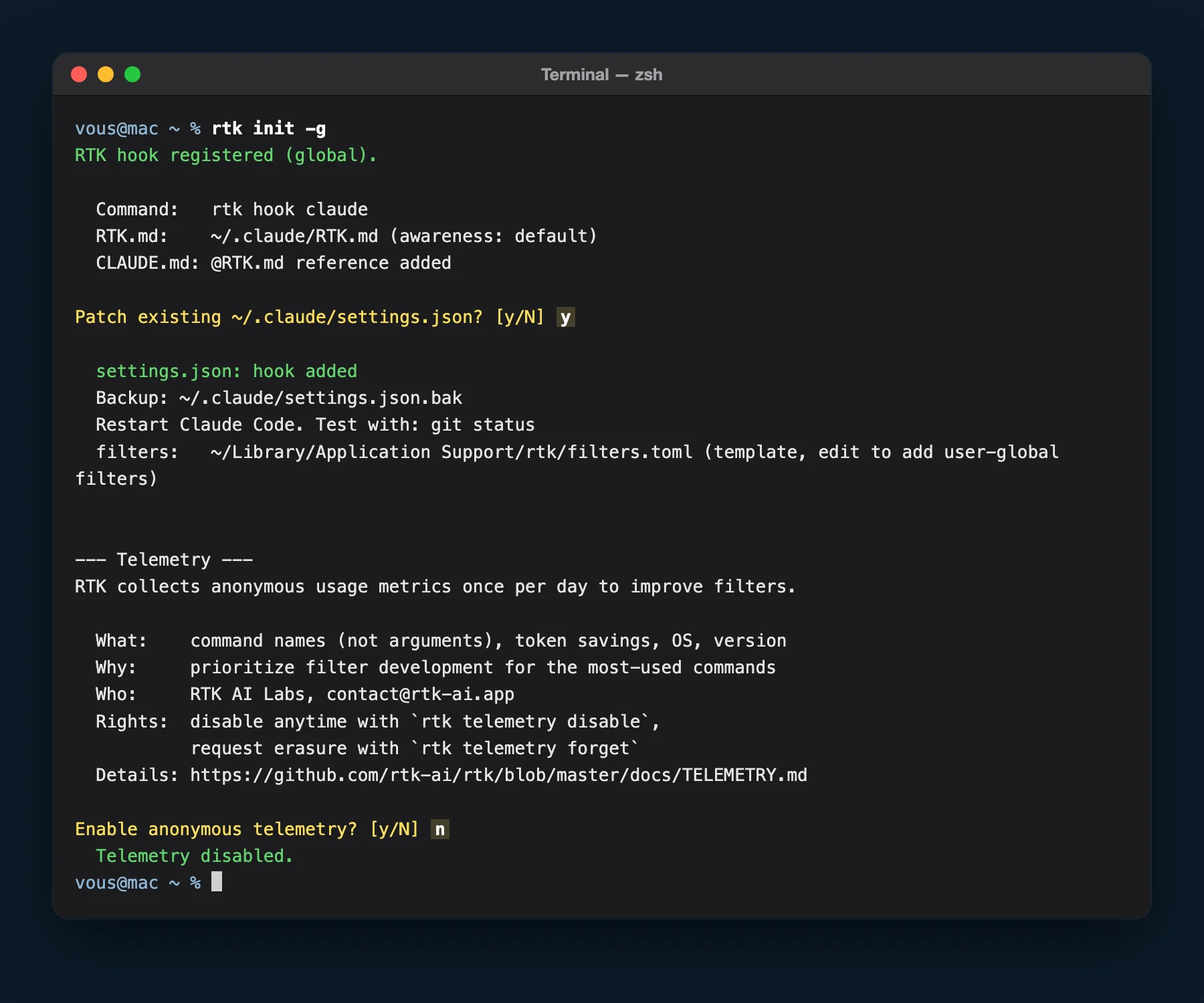
rtk init -g: y to hook RTK up, n for telemetry. The green line “settings.json: hook added” confirms the hookup.In practice, the command touches 3 files in the .claude folder, and keeps a backup copy of your configuration (settings.json.bak):
settings.json, Claude Code's configuration, gets a hook: a rule that runs automatically before each command Claude launches, and routes it through RTK;RTK.md, a note a few lines long, tells Claude what RTK is for;CLAUDE.md, the instructions file Claude reads at the start of each session, gets an@RTK.mdline that points to that note.
Last step, and the one most often forgotten: restart the Claude app. Quit it completely (Cmd + Q on Mac), then reopen it: the hook is only read at startup. The app's Code tab reads this setting just like the command-line version, and that's how I work every day. On the command line, type /exit then launch claude again.
Check your savings
Don't feel like going back to the Terminal? Ask Claude, in the Code tab: “run rtk init --show then rtk gain, and explain the result to me”. Otherwise, here are the 2 manual checks.
First check, right after reopening the app: rtk init --show. The Hook, RTK.md, Global and settings.json lines should start with a green [ok]. The gray [--] lines relate to other tools and can be ignored.
![Mac Terminal: rtk init --show displays [ok] for the hook, RTK.md, global CLAUDE.md and settings.json](/assets/illustrations-blog/installer-rtk-capture-verification.webp)
[ok].Second check, after a real work session with Claude: rtk gain. RTK shows a dashboard with the number of filtered commands, the tokens saved, and a breakdown by command type. Here's mine as of September 25, 2026, after several months of daily use on this site, my content and my client projects.
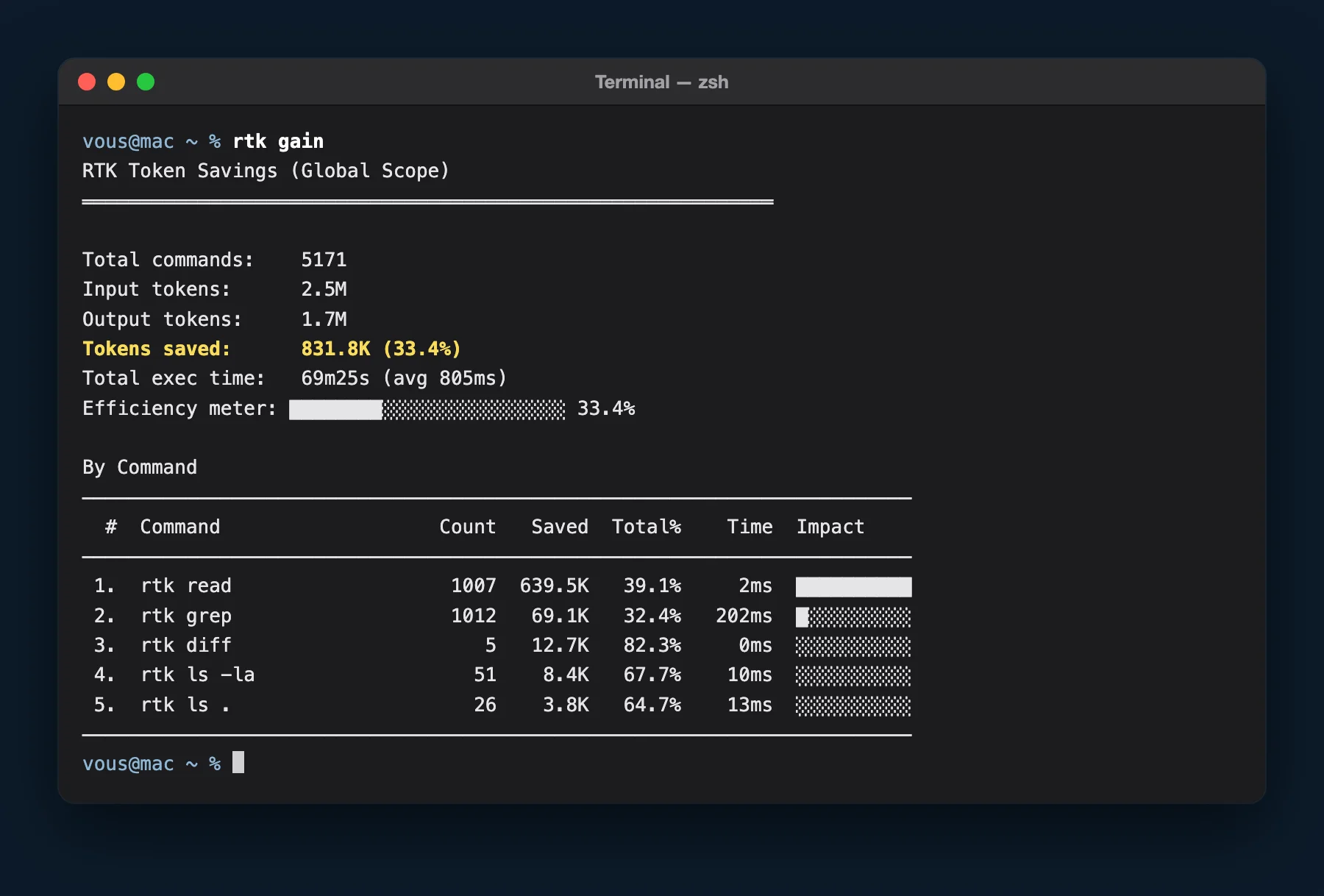
Translated into everyday tasks, here's what RTK removed for each type of command:
| What Claude does | Filtered command | Times | Tokens removed |
|---|---|---|---|
| Read a file | rtk read |
1,007 | 39% |
| Search a folder for a word | rtk grep |
1,012 | 32% |
| List what a folder contains | rtk ls |
51 | 68% |
| Compare 2 versions of a file | rtk diff |
5 | 82% |
The project claims 60 to 90% savings on common commands. My 33% is lower for a simple reason: Claude Code also has its own tools to read and search files, and those don't go through the terminal, so they don't go through RTK. RTK's documentation says so itself. To go further, rtk discover analyzes your Claude Code history and lists the commands that could have gone through RTK.
The 5 snags I see in training sessions
When the install gets stuck, it's almost always one of these cases. The symptom is what you see on screen.
| Symptom | Cause | Fix |
|---|---|---|
command not found: brew right after installing Homebrew |
The Next steps lines weren't run | Scroll up in the terminal, copy the lines under Next steps and run them |
command not found: rtk or “rtk is not recognized” |
The terminal was open before the install | Close the terminal and open a new one |
rtk gain returns an error |
Another tool has the same name (Rust Type Kit), often installed by cargo |
Run cargo uninstall rtk, then reinstall with Homebrew or winget |
rtk gain stays at 0 after a session |
The Claude app wasn't restarted, or the hookup got a no ([y/N] question declined, or command run by Claude without --auto-patch) |
Run rtk init -g --auto-patch again, then quit and reopen the Claude app |
Warnings that mention rg on Windows |
ripgrep isn't installed | winget install BurntSushi.ripgrep.MSVC |
One last tip: if you're stuck on an error message, copy it and paste it into Claude. It's very good at explaining what the terminal is trying to tell you.
Security and data: what RTK sees
RTK sees everything the commands display, including the content of the files Claude reads for you. The question deserves 2 minutes of your time, especially if you work on client files.
Filtering happens on your computer. Telemetry, meaning usage statistics sent to the publisher, only turns on with your consent: it's the second question asked by rtk init -g. If you answered yes, RTK would send, once a day, the names of the commands run (without their parameters), the tokens saved, your operating system and the version, as its policy explains. With --auto-patch, the question isn't asked and telemetry stays off. Check at any time with rtk telemetry status.
As with any tool that plugs into Claude Code, install RTK only from its official sources (Homebrew, winget, the rtk-ai/rtk repository), and ignore links received in messages. I covered the broader question in my article on data privacy when you connect an AI to your tools.
Update or uninstall RTK
RTK moves fast: 4 versions came out in September 2026. Updating once a month is plenty, with brew upgrade rtk on Mac or winget upgrade rtk-ai.rtk on Windows. You can also just ask Claude Code to update RTK.
To uninstall, follow this order: first rtk init -g --uninstall, which unhooks RTK from Claude Code, then brew uninstall rtk on Mac or winget uninstall rtk-ai.rtk on Windows. Done in the reverse order, Claude Code would look for a missing tool every time it ran a command.
If you run Claude Code workshops yourself, send this link to participants a few days ahead. The install is done beforehand, and workshop time goes to actual production. That's what I now do before each of my training courses. Next, my articles on building a website with Claude Code and on the best Claude skills for marketing will give you something to do with the tokens you saved.