Why I rebuilt everything this fall
My training business is growing. A 13-participant session starts on November 19, another one in January, and my partner Adam puts together proposals on his own.
Until now, each cohort shared a single password. Documents went out by email, the placement test lived in a Tally form and the e-learning on another platform. That worked for the first cohort. With 3 sessions running in parallel, it breaks.
I asked myself a simple question: how far can you go with Claude Code today? Claude Code and n8n automations are my trade: I use them every day and I train teams to use them. I wanted to see whether a training provider could do without off-the-shelf software without cutting any corners on Qualiopi.
The calendar pushed me. Decree No. 2026-728 of August 1, 2026 (in French) put a new Qualiopi framework into effect on November 1. Its indicator 19 requires checking that modules taken remotely are actually completed. So you need records, and reliable ones.
The learner pipeline in one diagram
From the sales proposal to the satisfaction questionnaire at 60 days, everything runs through 4 building blocks:
- the jessem.fr website, which hosts the cohort spaces (PHP, with data stored outside the public part of the server);
- n8n, self-hosted on a small server, which connects the tools;
- Google Workspace for Drive, Calendar and Meet video calls;
- Brevo for emails, and Gemini Flash to draft the session recaps.
Claude Code wrote the site's code, the n8n workflows and the tests. Once delivered, the platform runs on its own, without it.
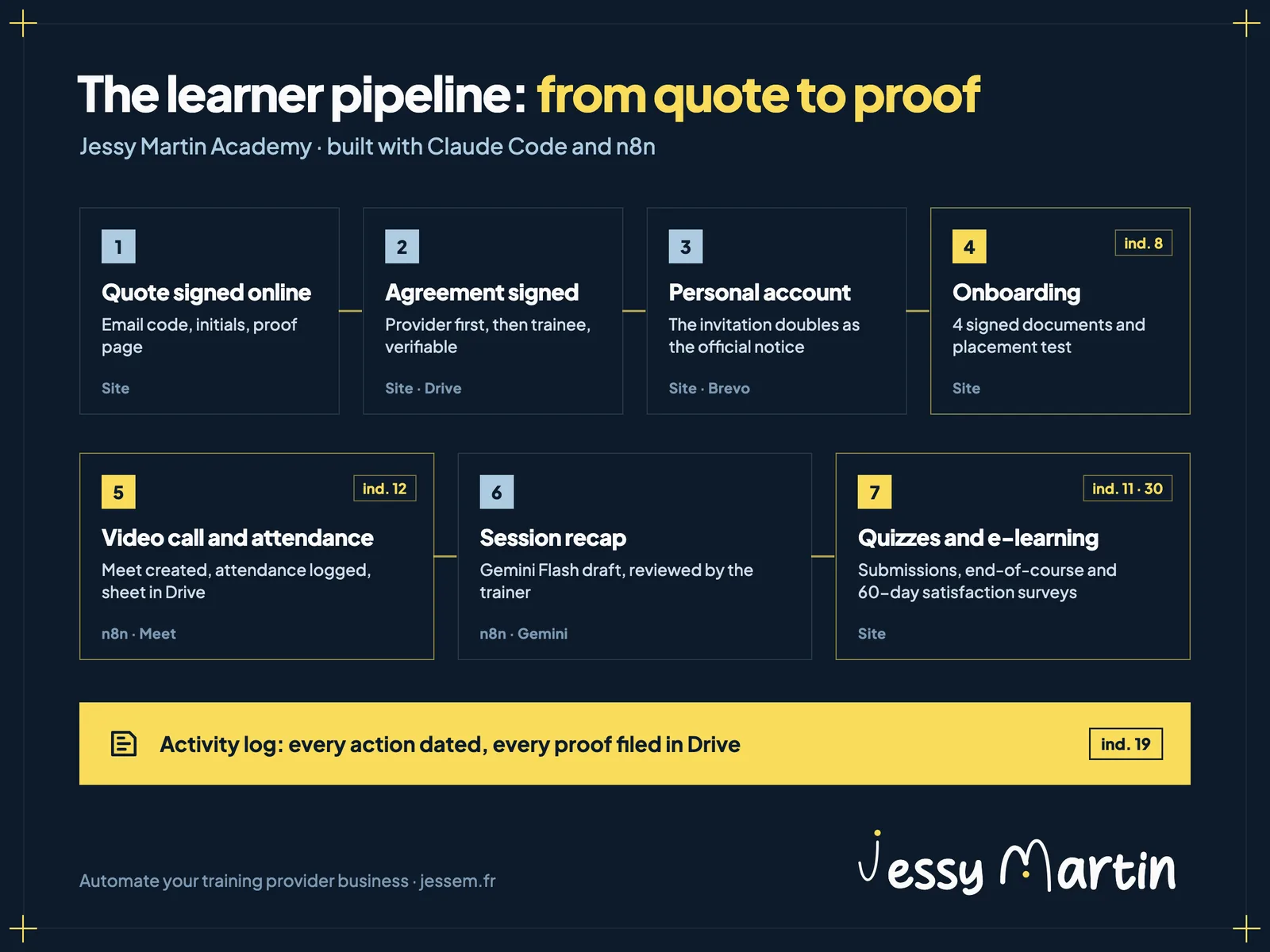
The pipeline step by step
1. The proposal and quote signed online
Each client gets a dedicated page behind an access code. There, they read the proposal and sign the official quote: a one-time code received by email, initials, then a proof page added to the PDF.
Adam never opens the code. He drops his proposal into a Drive folder; n8n picks it up every 10 minutes and publishes a test version. I get an email and approve the release in one click.
2. The training agreement signed by both parties
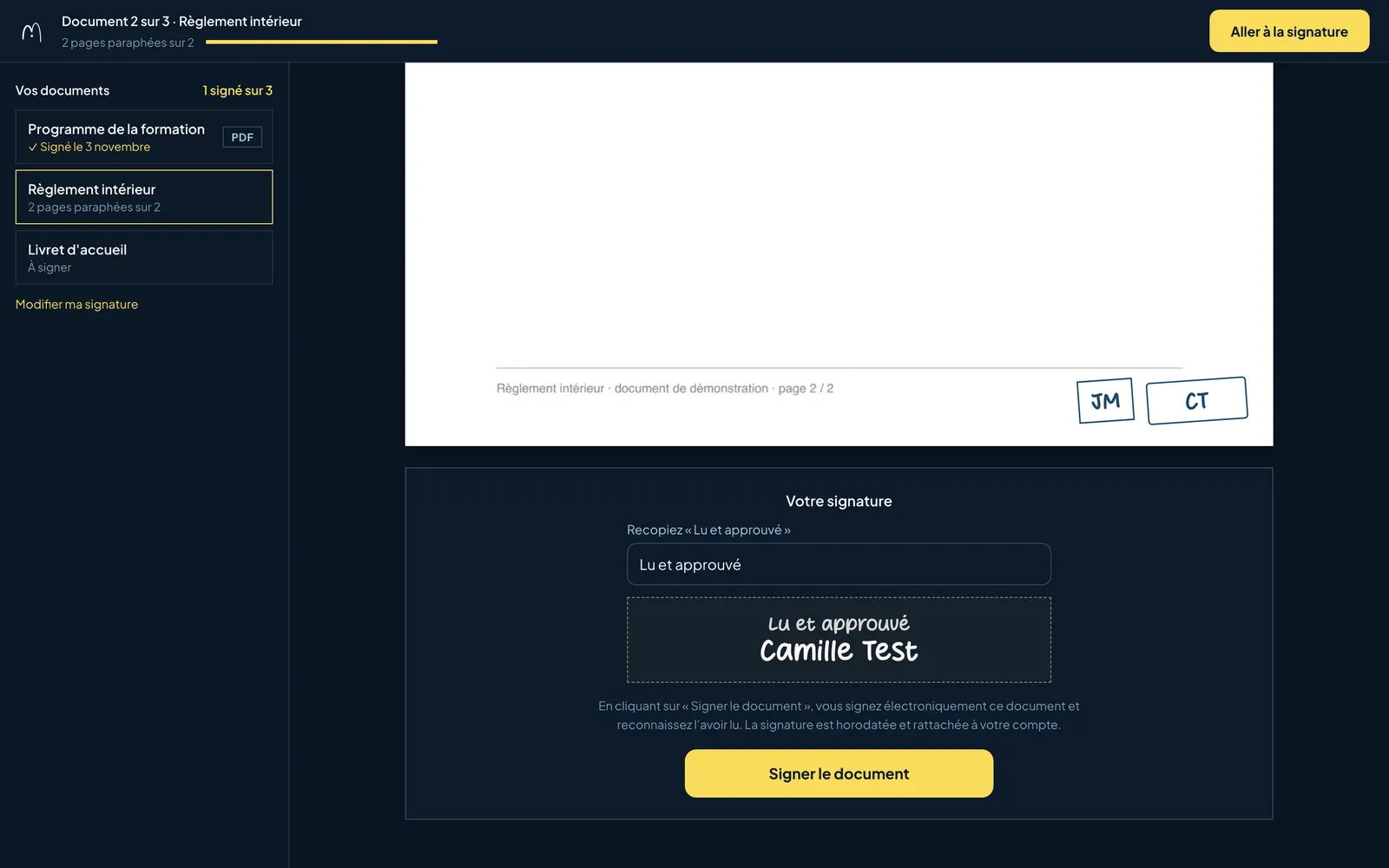
The provider signs first, with its initials and its stamp. The trainee signs next from their space, after typing out “Lu et approuvé” (read and approved).
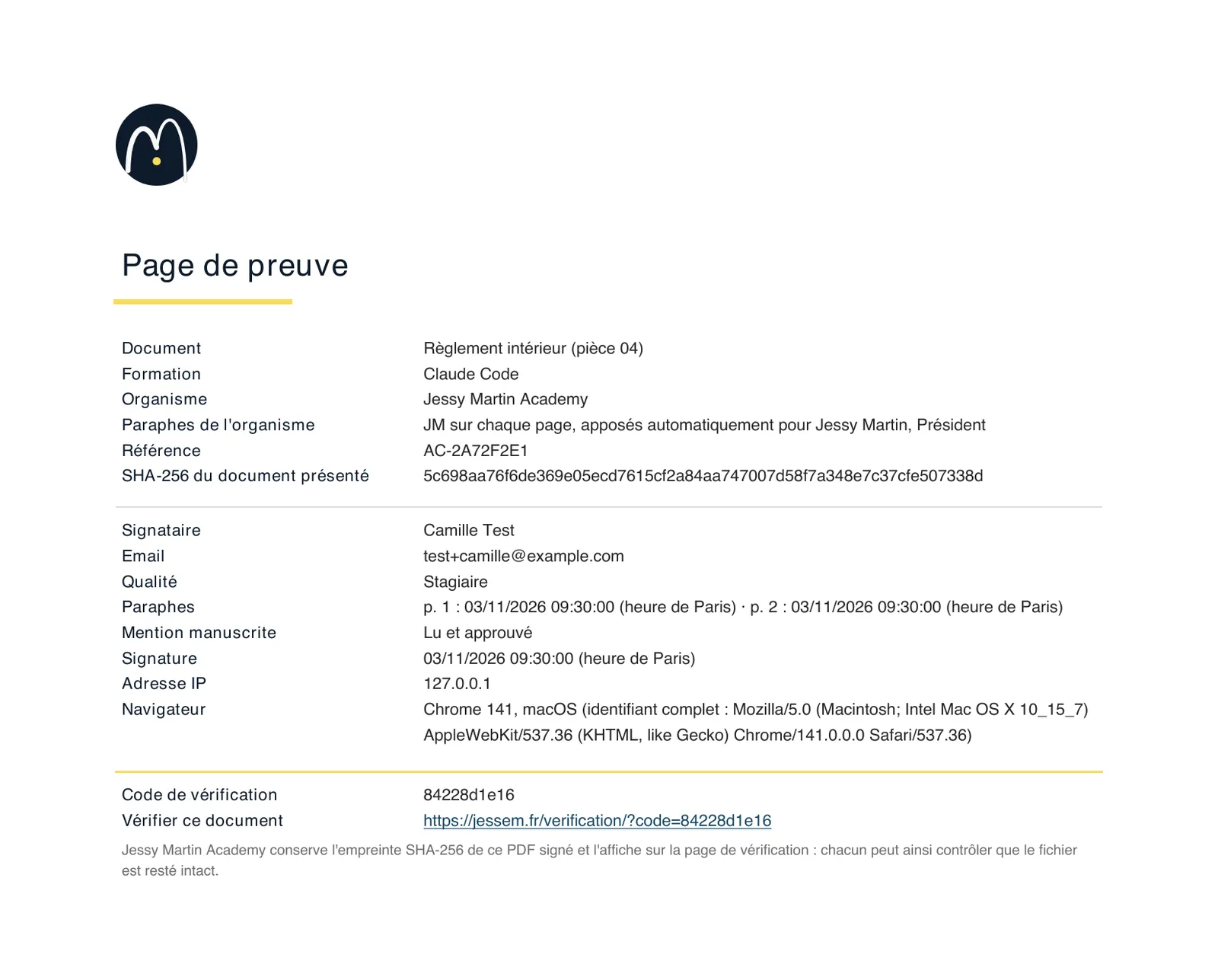
Each PDF ends with a proof page: the signers, the time of each initial, the IP address, the browser, the document's hash and a unique code. A public verification page compares any PDF with the original, without the file ever leaving the computer of the person who checks it.
3. The invitation doubles as the course notice
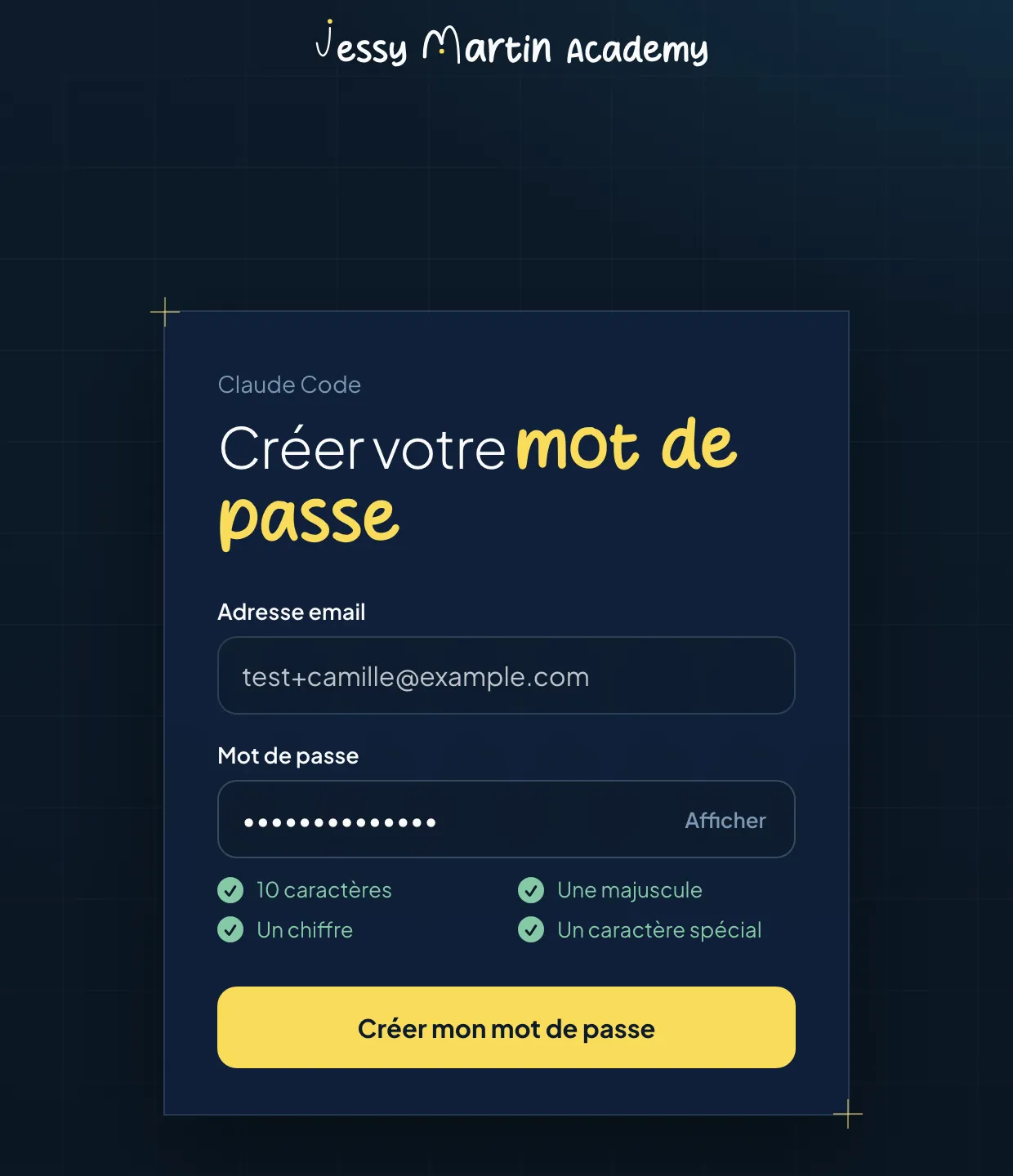
Each participant receives a personal invitation link, valid for 14 days, to create their password. If they lose it, they can create their account with a 6-digit code received by email, provided their address is on the session list.
One account covers every course taken with us. It carries one role per session: learner or trainer. Adam and I are administrators of every session.
4. First-visit onboarding
On the first login, the space runs the onboarding in this order:
- a welcome message;
- 4 documents to initial and sign: the training agreement, the program, the internal rules and the welcome booklet;
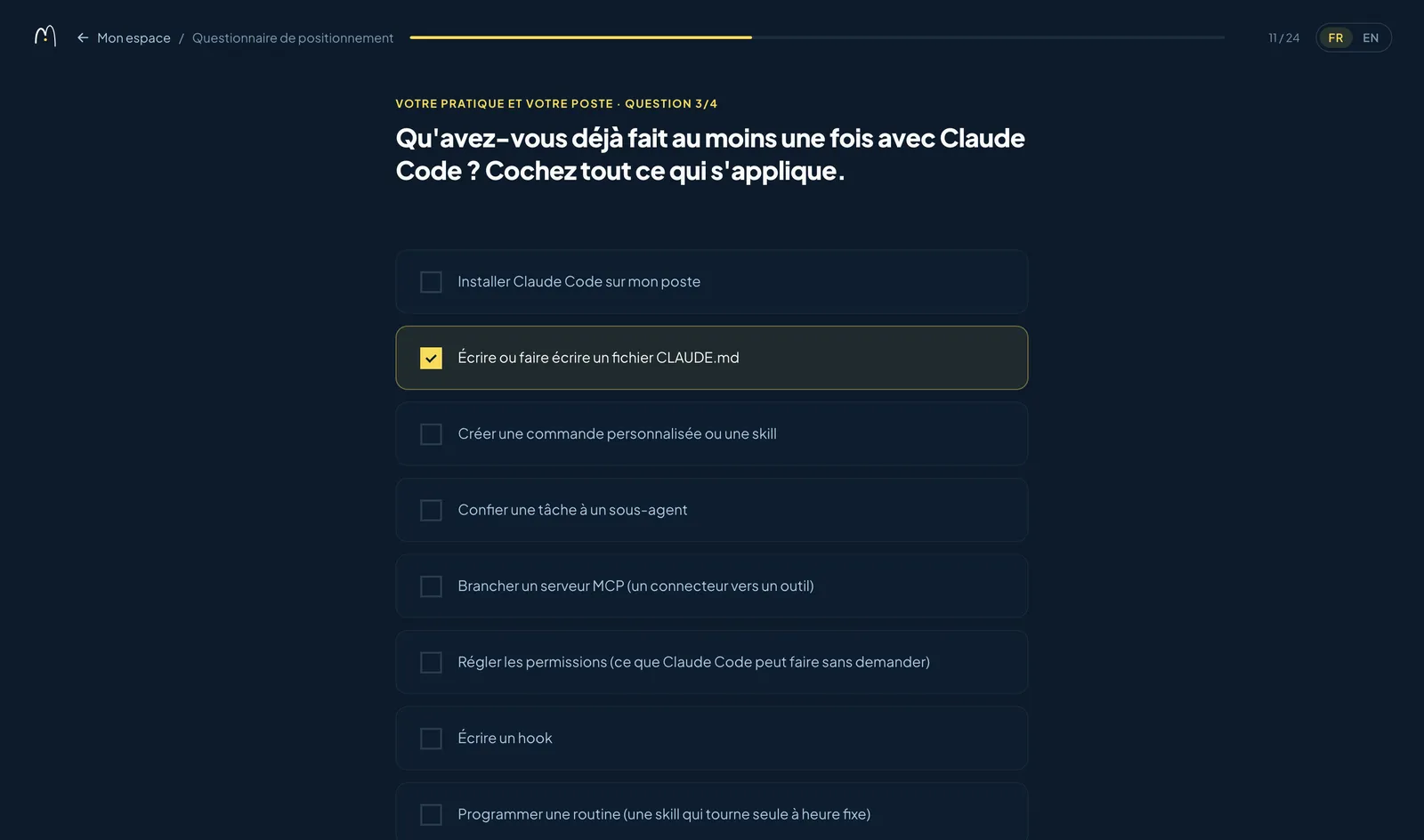
- the placement test;
- the profile, with an optional photo;
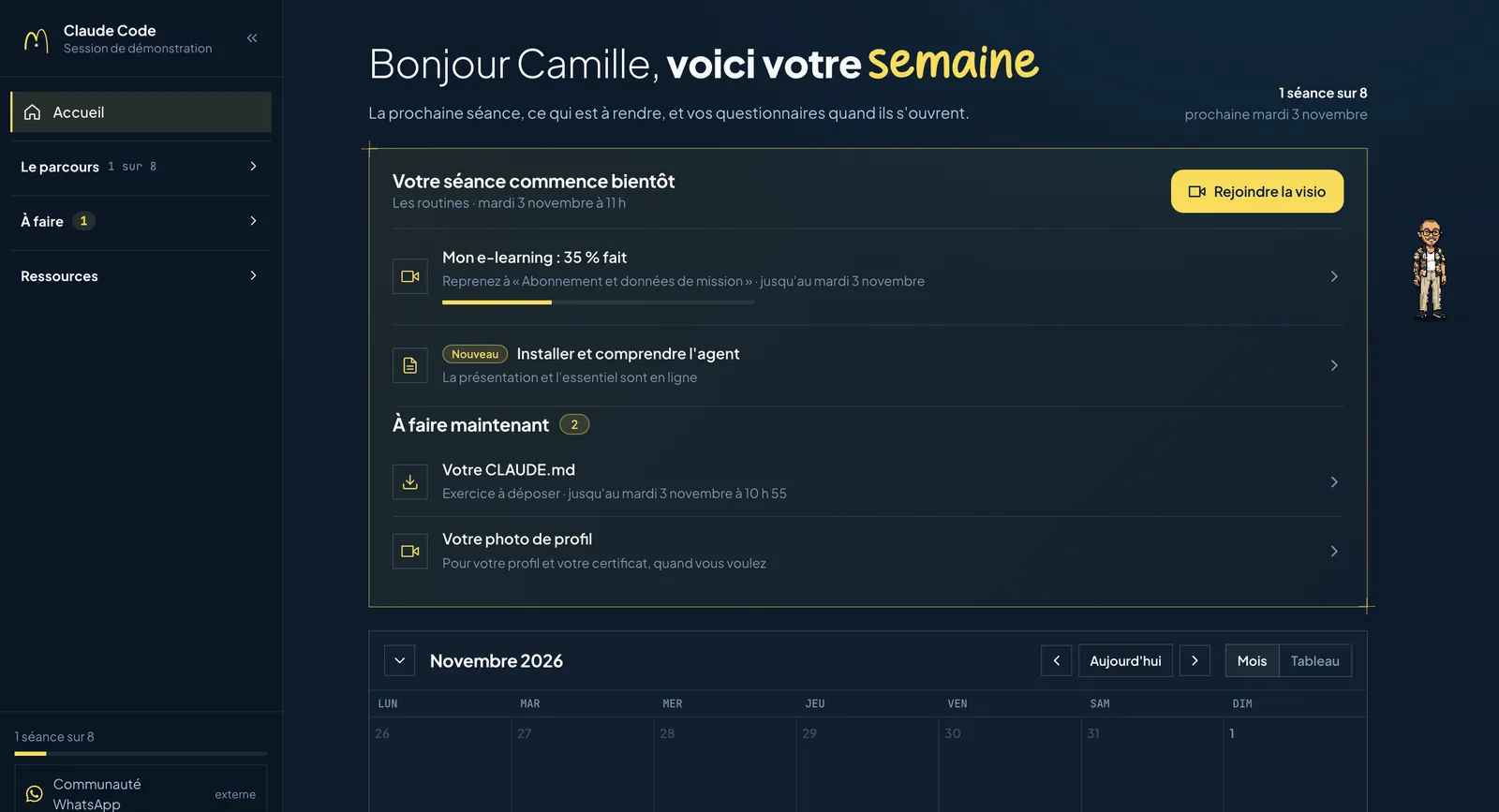
- a guided tour of the space, in speech bubbles, given by my pixel-art avatar.
Until the documents are signed, the rest of the space stays locked, and a reminder goes out every morning at 9 a.m. Signing the 4 documents takes 28 clicks and about 30 seconds, on a computer or a phone (measured during acceptance testing on November 2).
The placement test has 23 questions, or 25 for those taking both tracks of the course. The first version had 46.
5. Video calls and attendance
Every hour, n8n looks at upcoming sessions and creates their Google Meet meeting, with automatic recording and transcription. Trainers are made co-hosts, and the event lands in the calendar.
In the space, the session card changes state: “Add to my calendar” the day before, “Join the video call” an hour before. Reminders go out the day before and an hour before.
12 hours after the session, n8n retrieves the participants through the Meet API. The site matches them with the registered trainees, counts each person's minutes of attendance and files the attendance sheet as a PDF in the session's Drive.
6. The session recap drafted by Gemini Flash
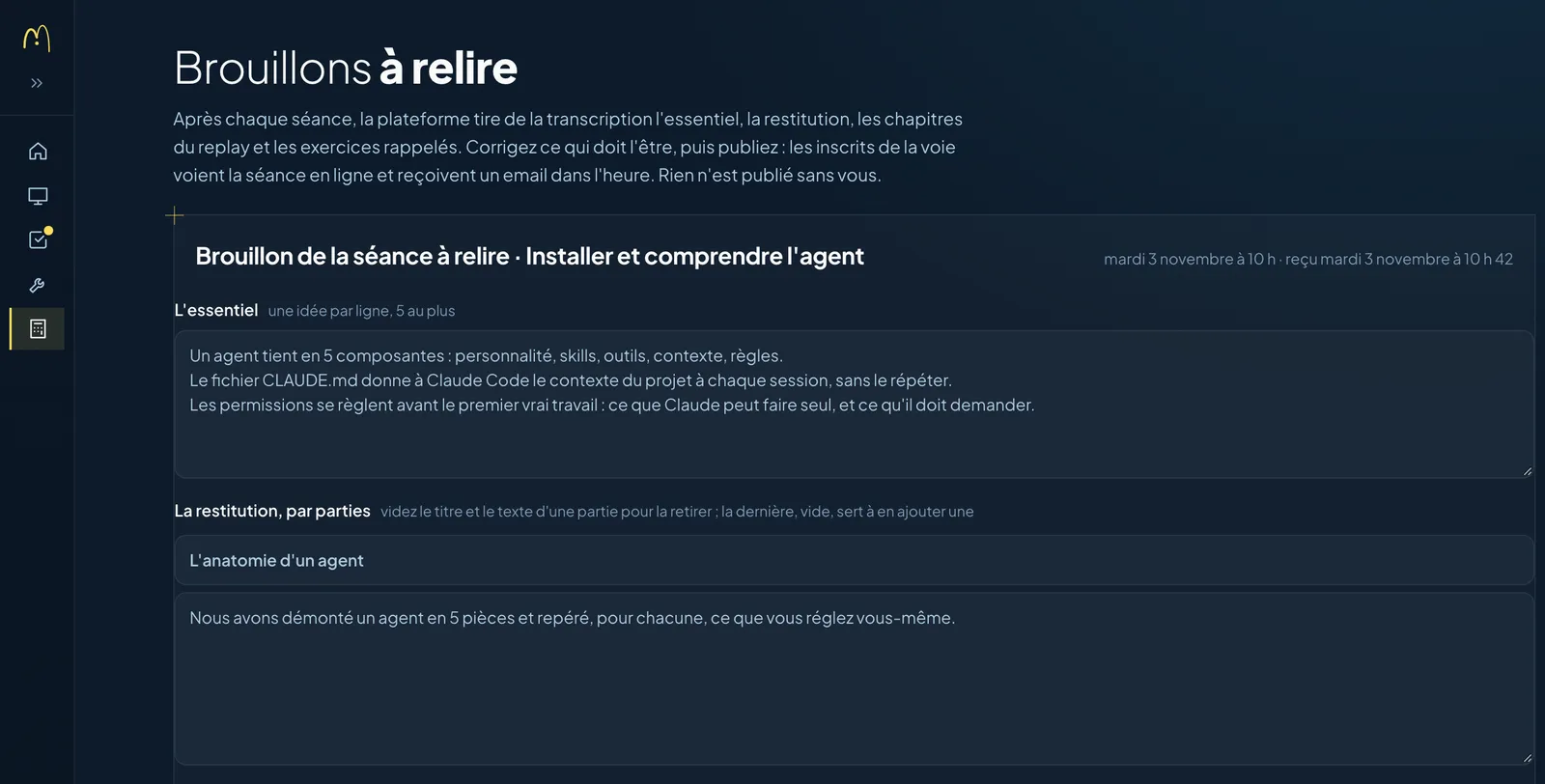
After the session, n8n retrieves the Meet transcript. Gemini Flash turns it into a draft in a fixed format: the key points, the recap, the replay chapters and the exercises.
I chose Gemini Flash for its cost: one recap per session, on transcripts several hours long, adds up. The trainer reviews the draft, corrects it and publishes it. Learners then get an email titled “The session is online.”
7. Questionnaires and exercises alongside e-learning
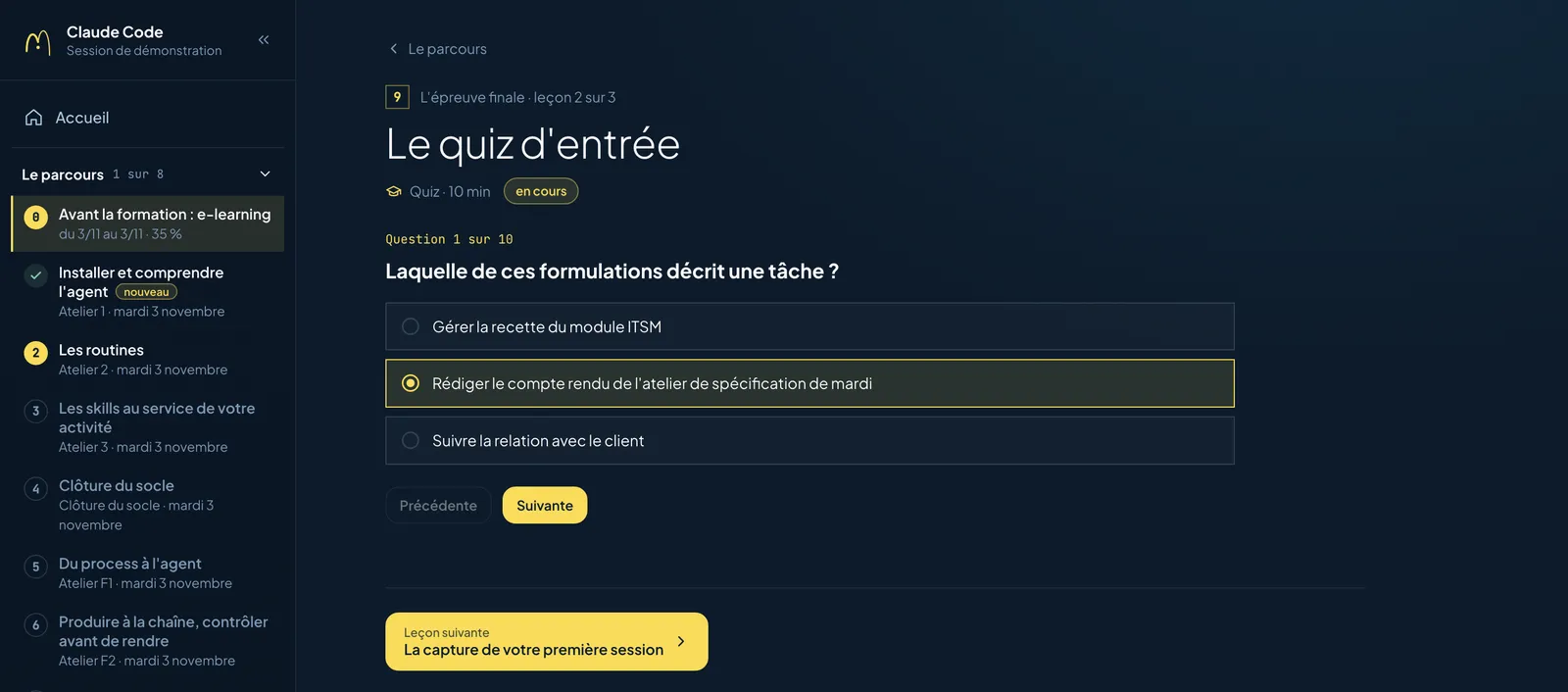
Each questionnaire opens at its set time: placement test, end-of-module quizzes, exit assessment, satisfaction right after the course, then again 60 days later. Once submitted, answers are locked. Answer keys are never sent to the browser, so nobody can read them in the page's code.
Exercises are submitted as a file or a link. A private Drive link is detected and flagged before submission, because a trainer who can't open it can't grade it.
The pre-course e-learning (7 hours in 9 modules) lives in the same space. Viewing is measured for each video, and the quizzes have a passing score, a number of attempts and a waiting period between 2 tries.
8. The activity log and trainer follow-up
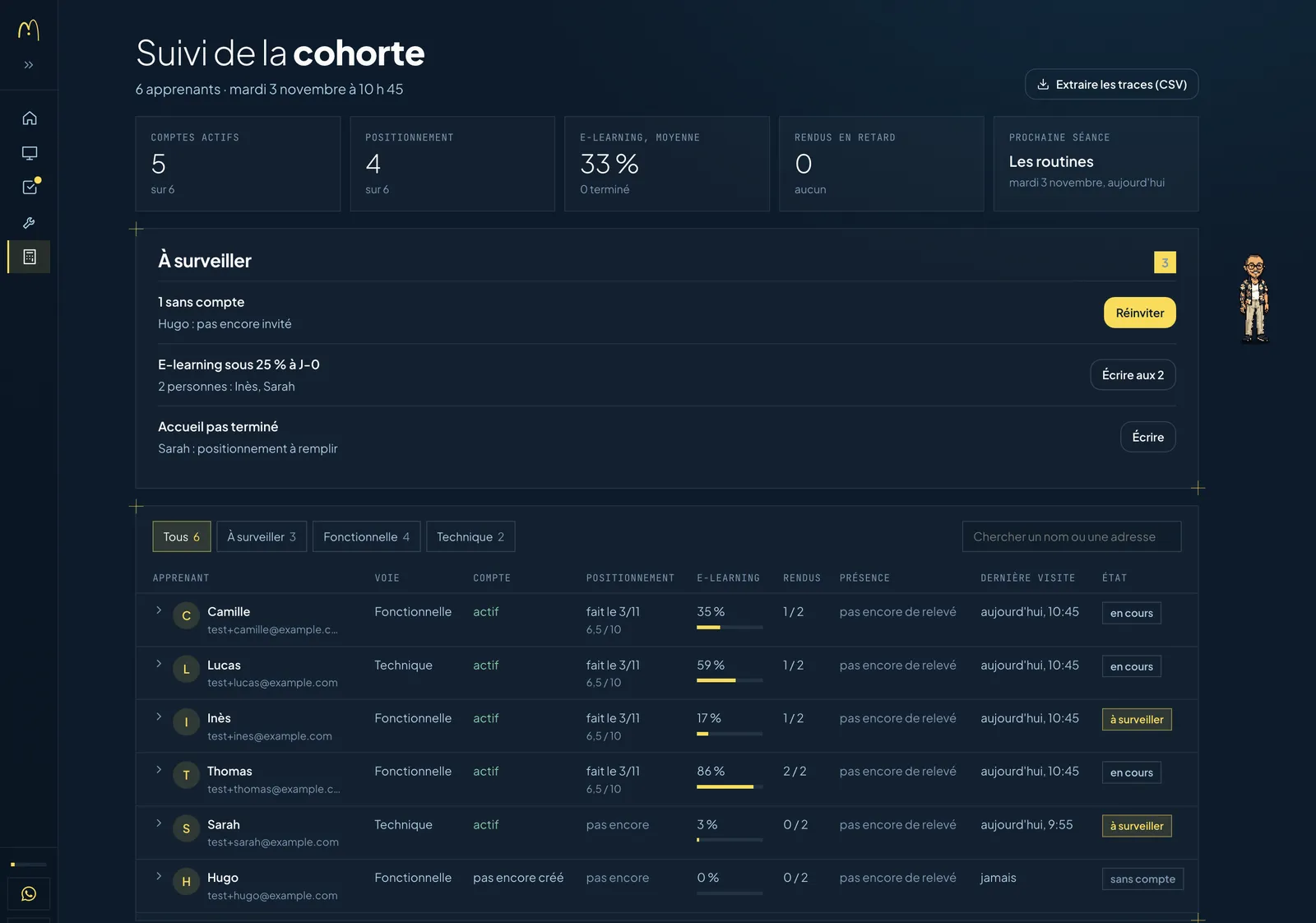
Every action is written to a log: who, what, on what, when and with what result. Opening a lesson, watching a video, submitting an exercise, signing, joining the video call.
This log feeds 3 things: the learner's progress bar, the trainer's dashboard (who's dropping off, who hasn't submitted, logged reminders) and an export per trainee, in the format a funder may request for a distance course.
A “Report a problem” button completes the setup. The person receives an acknowledgment, and n8n records the complaint in the provider's shared register.
The Qualiopi proof produced along the way
Each step files its proof at the moment it happens, timestamped, in the session's Drive.
| Step | Proof produced | Qualiopi indicator |
|---|---|---|
| Placement test | Timestamped answers, CSV export to Drive | 8 |
| Quizzes, exit assessment, exercises | Scores, dated submissions, before and after | 11 |
| Attendance and reminders | Minutes of attendance, attendance sheet, logged reminders | 12 |
| E-learning and remote work | Activity log, export per trainee | 19 |
| Satisfaction right after and 60 days later | Ratings out of 10, recommendation from 0 to 10 | 30 |
| Complaints | Acknowledgment, entry in the register | 31 |
The signed training agreement, program, internal rules and welcome booklet go into the same folder, with their proof page. On audit day, I open one folder per session.
How Claude Code drives n8n
n8n runs on a server I rent from Hostinger. 6 workflows run the Academy in production:
- the hourly run, which triggers the emails, the reminders and the photo purge;
- filing the signed documents in Drive;
- the complaints register;
- creating the video calls;
- the post-session run (attendance, transcript, recap draft);
- publishing Adam's proposals.
Claude Code accesses it in 2 ways. The n8n-mcp MCP server lets it read, create and edit workflows from the conversation. The installation scripts use the n8n API to set up a workflow in one command. Dedicated skills give it the patterns, the node configuration and the validation rules.
One rule never changes: back up the active workflow, make a test copy at a separate URL, run the tests, and only then update production. No workflow is activated without my approval.
Between the site and n8n, the webhook URLs are random and kept outside the versioned code. In the other direction, n8n presents a signed key that the site checks. If n8n goes down, the documents wait in a queue on the site and go out again on the next run: nothing gets lost in an outage.
git clone --recurse-submodules https://github.com/Littlpinguin/n8n-workflows-methodologie.gitThe repository also includes 3 public workflow libraries (just over 5,000 workflows in total) that Claude Code checks before building. The Claude Code basics are in Claude Code training: the complete learning path.
Securing access to a training platform
A training platform holds names, emails, answers, assignments and signatures, so I locked down access:
- One account per person. The shared cohort password is gone, along with the link that logged people in on its own.
- Strong, hashed passwords: at least 10 characters with an uppercase letter, a digit and a special character, stored with the Argon2id algorithm.
- Short-lived codes and links: a code sent by email is valid for 15 minutes and 5 attempts, a reset link for one hour. The server only stores their hash.
- Revocable sessions, held on the server side. Changing your password logs out your other devices.
- Capped attempts per IP address on login, submissions, questionnaires and the assistant.
- Data kept out of reach: stored outside the public part of the server, never in Git. Access keys live in a configuration file that is never versioned.
- A protected internal dashboard: any new device requires a code sent by email, and an alert goes to Adam and me.
Under the GDPR, each piece of data has its own retention period: 6 years for the training record, and one year after the last course for the profile photo, which is purged automatically. The space's assistant receives nothing from the private pages.
Gemini is a processor under the GDPR, to be listed in your records of processing. For a European account, the Gemini API terms apply the paid-tier rules to all usage: Google doesn't use prompts or responses to improve its products, and only keeps them long enough to detect abuse. The other rules to know are in AI and marketing customer data.
What I refused to automate
Some decisions stay with a human, by choice.
- An administrator sends each invitation by hand and decides who gets into a space.
- Each recap is reviewed by the trainer before publication. Gemini drafts, and the trainer signs off.
- A proposal only goes online after my approval.
- The log only records what happened, at the time it happened. A missing record stays missing.
For the rules that must hold no matter what, I write the check directly into the code: the method is in Controlling your AI agents with Claude Code hooks.
What I'm still finishing
The pipeline has been in production since November 3. I'm still finishing 3 pieces:
- the end-of-training certificate and the certificate of completion, generated by the platform. For now, a script produces them: 7 certificates published for the first cohort;
- creating a session without touching the code. For now, a session fits in a configuration file that Claude Code prepares;
- the signature workflow for trainers' contracts, from the filled-in Google Doc to the signed PDF, in testing.
Build or buy: an honest comparison
I collected the public prices of the most frequently cited software on November 3, 2026, from their pricing pages (in French): Edusign, Digiforma and Dendreo. Next to them, my build, priced at what I would bill a client training provider.
| Edusign Indépendant | Digiforma Indep | Dendreo Starter | Custom build (Claude Code and n8n) | |
|---|---|---|---|---|
| Scope | Attendance, questionnaires, signed documents | Complete training provider software: learner portal, basic e-learning, BPF [the annual educational and financial report French training providers file with the State], invoicing | Complete training provider software: learner portals, BPF, invoicing | The learner pipeline described above |
| Listed price | €29 per month, billed annually (excl. or incl. VAT not specified) | €49 excl. VAT per month with a one-year commitment, plus €29 for e-signature | €225 excl. VAT per month, no commitment | No software subscription |
| Setup | No fees listed | No fees listed | From €1,490 | €6,000 to €8,000 (4 days of an expert's time) |
| Your time | Configure the tool | Configure your templates and sessions | Assisted configuration during setup | Describe your documents and your learner path, then review and test |
| Running costs | Included, with a quota of 200 attendance signatures per month | Included, up to 200 learners per year | Included, 2 users | n8n server from €7.79 per month (€14.99 on renewal), site hosting, a few cents of Gemini per session |
| First year | €348 | €936 excl. VAT | €4,190 excl. VAT | About €6,100 to €8,100 |
| Over 3 years | €1,044 | €2,808 excl. VAT | €9,590 excl. VAT | About €6,400 to €8,400, excluding later changes |
| What the learner sees | The vendor's app | The vendor's learner portal | The vendor's learner portal | Your own space, in your colors, with your learner path |
| Regulatory changes | Handled by the vendor | Handled by the vendor | Handled by the vendor | Up to you or your service provider |
The 4 days are my own time, and Claude Code and n8n are both my trade. Someone new to these 2 tools will take considerably longer.
For an independent trainer who runs a few sessions a year, Digiforma Indep or Edusign cost less than anything I could build. At €936 a year, a €6,000 build takes more than 6 years to pay for itself.
Against Dendreo, the gap narrows: €4,190 the first year, then €2,700 a year. A custom build pays for itself in 2 to 3 years.
A custom build makes the most sense when the learner experience is part of your teaching approach, or when your documents and your learner path don't fit any software. The BPF, invoicing and the online catalog are still better served by specialized software: I didn't rebuild them.
3 options for training providers
- Buy off-the-shelf software. The right choice for a small volume, or if nobody on your team wants to maintain a tool.
- Have your pipeline built. Budget €6,000 to €8,000 for the equivalent of mine, adapted to your documents, your tools and your learner path.
- Build it yourself. The n8n method is public, and Claude Code can be learned. Jessy Martin Academy teaches training providers to lead their own team of AI agents, with use cases from their own line of work.
Have your training pipeline built
30 minutes to look at your current learner path, what can be automated and what it would cost you.
Book a call