

Why a copilot instead of a plain ChatGPT prompt?
When you run marketing for several brands at once, you hit the same wall fast. You open ChatGPT, Claude or Gemini and ask for a LinkedIn post for the first brand. The tool writes something decent but generic. You close the tab, reopen it 2 hours later for the second brand, and go through the exact same routine: paste the context back in, describe the tone again, add the past examples again. After a week, you've lost a full day explaining to AI tools who your clients are.
Claude, GPT-5 and Gemini have all become excellent models. The trouble is that every session starts from zero. No memory of past decisions, no link to the editorial guidelines approved last month, no access to the latest published archives. Every task turns back into a full brief you have to write again.
Between my own businesses, the accounts I support (N2 Help & Solutions, the French mutual insurer Mutuelle Entrenous, Pando Studio) and Qiplim, which I co-founded, I needed a real system: one folder per brand, a living memory, documented voice guidelines, searchable reference archives, and an orchestrator able to juggle all of it. The word "copilot" captures what I was after better than "agent" or "assistant": a colleague who knows the company inside out, remembers past projects and writes in the right tone the first time.
I built this copilot with Claude Code, Anthropic's tool that runs in the terminal. And rather than keep it to myself, I've just released it as an open-source template under the MIT license. Anyone can fork it, run the setup wizard and have an AI marketing system configured for their own brand within an hour. It's also the marketing counterpart of my Claude Code starter for building websites: the same philosophy, applied to another trade.
How does the copilot work? 8 modules and one folder per brand
The core idea is simple. Every brand I manage has its own self-contained folder. Inside are 8 numbered subfolders, each matching a distinct marketing role. When I work on email for Mutuelle Entrenous, I open that brand's 04-email folder. When I move on to Qiplim's next landing page, I open Qiplim's 05-web-content folder. Claude Code automatically loads the CLAUDE.md file of the current subfolder, and with it the voice guidelines, the templates, the reference archives and the rules specific to that role.
That's what you should expect from a well-built AI agent: a set of specialists who share one source of truth, where a generalist GPT tries to do everything from a single system prompt.
That source of truth is 01-brand, the founding module. Everything else refers to it: palette, typefaces, tone, personas, key messages, phrases to avoid, canonical examples. When the guidelines change, you update this folder and every operational module follows. The copilot can't forget: on every write, an automatic hook reruns a brand-check skill that compares the output with the guidelines. Any contradiction is flagged before the content leaves the copilot. You no longer need a human on watch to hunt down a word that's off-voice.
Next to 01-brand, the 02-strategy module plays the role of communications director. It handles the content pillars, the KPIs and the editorial calendar. And a quiet but central folder, _sources/, collects every meeting transcript, research note and piece of client feedback. Whenever you drop a file in it, the copilot adds it to its context. No knowledge ever gets lost, because everything said in a meeting ends up in the system's memory.
The other 6 modules are operational. 03-social-media covers LinkedIn, Discord and WhatsApp. 04-email handles newsletters, promotions and nurturing sequences. 05-web-content produces landing pages. 06-graphic-design assembles AI visuals, 1920×1080 HTML decks (with Playwright QA and a clean PDF export) and email signatures. 07-events orchestrates webinars and cross-channel communication plans. 09-blog-seo writes long-form articles and handles keyword research. The numbering skips 08 because the previous version of the template had a separate module for email signatures. In v0.3, 06-graphic-design absorbed that role. Less friction, same result.
The whole system gets set up with a single command in Claude Code: /start-copilot. That's the wizard. It walks you through brand discovery (by analyzing your website and your latest published content), suggests a design system, helps you pick the tools to connect (Notion or Airtable for the calendar, MailerLite or Brevo for email, Outline or Confluence for the knowledge base), turns on semantic memory if you need it, and validates everything with a generated sample. Allow 30 to 60 minutes, depending on how much public material you have.
3 real outputs from the copilot
To make this concrete, here are 3 recent deliverables from the copilot: 2 for Qiplim, the project I co-founded, and 1 for my own brand.
The Qiplim landing page
Qiplim is one of the brands the copilot runs day to day, and a project I co-founded. When the team needed a new showcase page for the onboarding phase, I opened the 05-web-content module in the Qiplim folder. The copilot already knew the guidelines (violet-on-cream palette, expressive typefaces, mascots front and center, a direct and product-focused tone), the standard sections of earlier pages and the social proof approved by the team. In one session, we generated the complete HTML structure and an on-brand design. The page went live on qiplim.com without a single line of code written by hand outside the copilot.
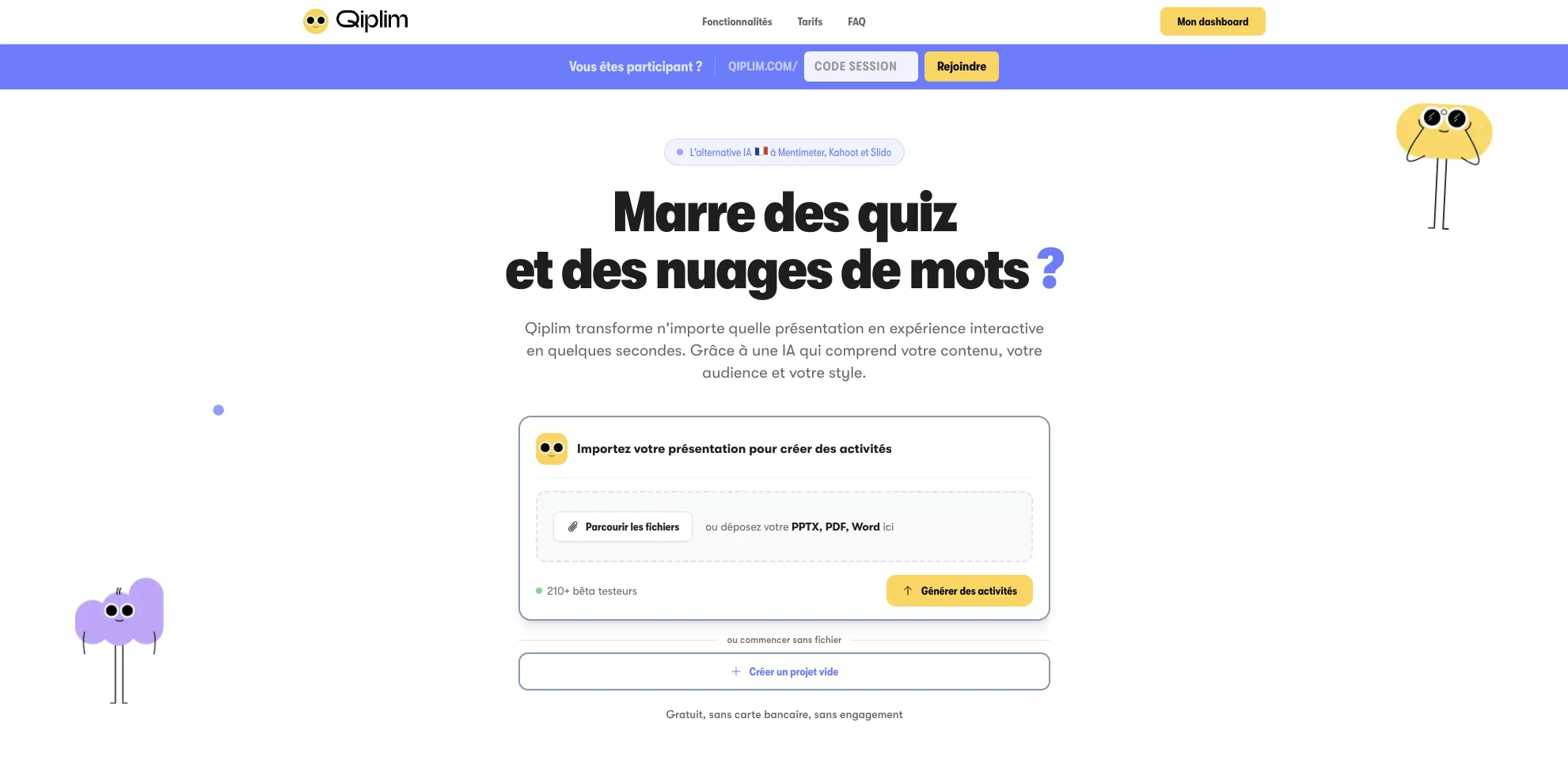
What strikes you in the result is how little it smells of AI text. You won't find "Boost your productivity with innovative solutions" anywhere. It sticks to specifics: what the product does, who it's for, what changes once you adopt it. The 01-brand module enforces this, because the brand voice is documented down to the list of banned phrases.
Qiplim's public launch deck
The 06-graphic-design/presentations/ module generates responsive 1920×1080 HTML decks, with a Playwright QA loop and a clean PDF export. That's the format behind Qiplim's public launch deck, shown below. The copilot assembled its 17 slides from Qiplim's 01-brand and the strategy notes accumulated in _sources/: market context, AI-native promise, product, activity formats, French sovereignty, traction proof, pricing, final CTA.
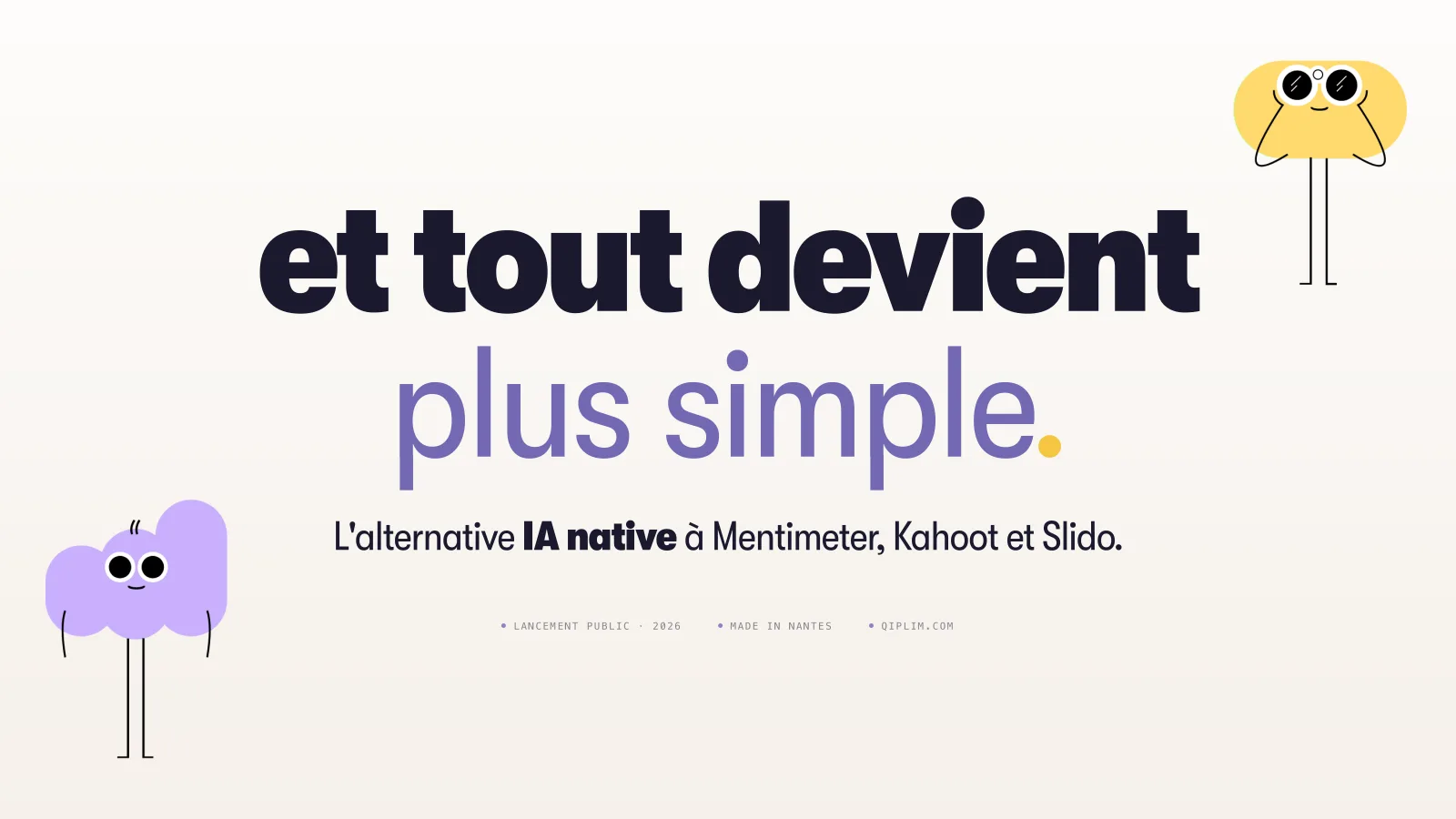
17 slides (in French) · open the PDF in a new tab or download the PDF
Nobody touched up a single slide by hand in Keynote or PowerPoint. The copilot built the HTML skeleton from the launch brief, applied the violet-on-cream palette from 01-brand and placed the Qiplim mascots in the right spots (the illustrations are approved upstream and stored in the brand folder). Then Playwright went through every slide to check that no text overflowed, that contrast met the guidelines and that the PDF export ran without layout shifts. The deliverable above is exactly what came out of the copilot.
The company LinkedIn banner
For the new Jessy Martin Consulting identity, I needed to refresh the company's LinkedIn banner. Rather than open Figma or Canva, I asked the 06-graphic-design module to generate a 1584×396 px banner featuring the STEP method I use in my advisory work. The copilot pulled the gold-on-midnight-blue palette from 01-brand, reused the Plus Jakarta Sans typeface and produced the visual below in HTML/CSS, then exported it to PNG with Playwright.
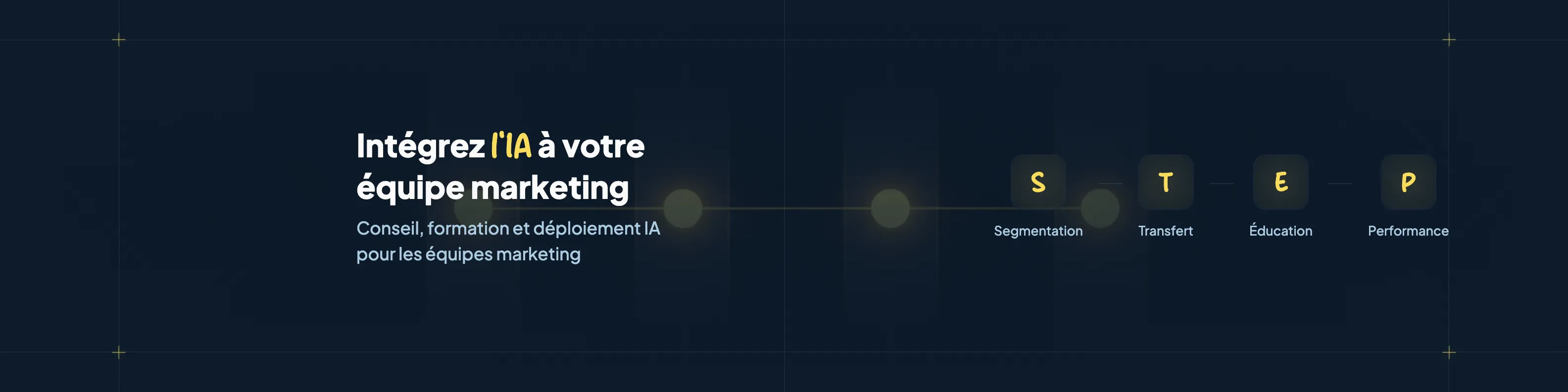
Nobody touched up this banner by hand either. It's live on the LinkedIn company page exactly as the copilot produced it. That level of consistency is what makes the difference day to day. "Roughly on brand" disappears, and so do the rounds of feedback to nudge a heading by 4 pixels. The system applies the rules. It's like having a living brand guide that checks every deliverable before it leaves the folder.
The copilot does for a marketer what an art director does for a studio: it brings a consistency you no longer have to defend on every deliverable.
How is the copilot different from a standard AI agent?
When I present this system to marketing teams, the first question is almost always the same: "Couldn't I get the same result with a custom GPT in ChatGPT?" The honest answer is no, and 3 concrete differences explain why.
The brand-check hook that can't be skipped
In Claude Code, you can wire up hooks. These are scripts that run automatically at specific moments, without Claude having to think about them. The copilot installs a PostToolUse hook that fires after every file write in a production folder. That hook runs the brand-check skill, which compares the output with 01-brand. If a banned phrase appears, if the tone drifts or if an unsourced statistic slips in, the system raises an alert before publication. It works as a guardrail. With a custom GPT, you depend on how attentive the model happens to be when it answers. With a hook, you depend on a rule that Claude Code itself applies every time.
Optional semantic memory
Below a certain volume (around 50 pieces of published content a month), the copilot works very well by reading the brand files directly. Above that, you switch to Qdrant, a vector database that indexes 01-brand, the published archives and the meeting transcripts. At that point, a request like "pull up the tone we used in the last 3 February newsletters" gets an instant answer. The copilot retrieves the most relevant passages in 500 ms and injects them into the context. That's retrieval-augmented generation, and it's what keeps you from repeating phrases or contradicting a press release published 6 months ago.
Tool-agnostic by design
The /tools-setup wizard makes no choices for you. It asks which tool you use for the editorial calendar (Notion, Airtable, Trello, ClickUp or Google Sheets), which email platform (MailerLite, Mailchimp, Resend, Brevo, ConvertKit), which knowledge base (Outline, Notion, Confluence, GitBook) and which event platform (Livestorm, Zoom, Riverside, Google Meet). Based on your answers, it regenerates the CLAUDE.md files of the relevant modules with the right connectors and conventions. You're never locked into an imposed stack. That's one of the things that reassured me most when I duplicated the system for my clients: no two had the same toolbox, and nobody had to change their habits.
Want to bring an AI copilot into your marketing?
The AI Marketing Cockpit: your brand encoded, your tools connected, 54 ready-to-use skills.
Discover the AI Marketing CockpitWhat the copilot doesn't do (and never will)
The copilot is no substitute for marketing judgment. Your strategy has to exist before the copilot can encode it. If your brand doctrine is fuzzy, the outputs will be fuzzy. If your personas are only a vague hunch, the content won't land with anyone. The system amplifies whatever you give it, flaws included.
That's why the /start-copilot wizard spends most of its time on 01-brand, far more than on API connections, Qdrant settings or tool choices. It crystallizes the brand voice, validates the personas and documents the proof points. Without that foundation, the copilot produces generic AI content, just like a poorly briefed custom GPT. It's the same logic as the STEP method I use in my advisory work: set the context before you launch the tool, because no tool can rescue a bad brief.
Your editorial calendar stays your call too. The copilot executes it. You're the one who says "this week, we push the retirement and income protection topic." It writes, adapts the content for each channel and turns it into visuals. The what and the why stay human. The same logic applies to content strategy: AI speeds up production, and the editorial decision stays with you.
Last point: setup takes some effort. You need a git repository, an active Anthropic account, ideally a Google AI account for image generation, and the willingness to learn how to work with Claude Code. If the command line puts you off, there are other routes (I covered them in my case study on building jessem.fr). For the copilot, though, the terminal remains the natural interface.
How can you try the copilot yourself?
The template has been public for a few weeks, under the MIT license. You clone it, run /start-copilot in Claude Code and follow the wizard. Sonnet 4.6 is plenty for most sessions (brand-check, copywriting and editorial consistency don't need Opus). Allow an hour to go from zero to a configured copilot, as long as you have your website, 2 or 3 recent content samples and the list of tools you already use ready.
The repo is here: github.com/Littlpinguin/marketing-copilot-template. For details on the module architecture, the skills and the connectors, I documented everything on the copilot project page. And if you want the same logic for building websites, my Claude Code starter applies the same mindset to business websites.
| Step | Command | Approximate time |
|---|---|---|
| Brand discovery | /brand-discover |
15 to 25 min |
| Tool selection | /tools-setup |
5 to 10 min |
| Archive indexing | /seed-corpus |
10 to 15 min |
| Semantic memory (optional) | /connect-qdrant |
5 min |
| Final validation | /validate-setup |
5 min |
Want a simpler place to start?
The course to get started with Claude: 5 videos, 6 skills to copy, 20 prompts and 20 AI tools with my comments. 100% free.
Get the free courseThe course videos and emails are in French.
Conclusion
I built the copilot to solve an operational problem. Once you manage several brands, or even one brand with multiple channels and archives piling up, you spend more time recontextualizing AI tools than producing content. A system that remembers, applies the brand guidelines automatically and works with your real tools solves that problem.
The strategic work stays on your desk, and you finally have the bandwidth for it. Thinking through your marketing remains your job. The copilot simply makes sure you never have to say the same thing twice. That's probably the only real productivity gain generative AI can offer marketing teams today.
If you'd like to discuss your own case, the 6-minute AI marketing diagnostic is still the most direct way in. And if you'd rather open the code and tinker with the template, the GitHub repo is open.